
When evaluating NovoServe vs Hetzner vs DigitalOcean for enterprise infrastructure in 2026, choosing a provider isn’t just a technical decision—it’s a margin decision.. As high-definition video streaming, real-time data pipelines, financial algorithms, and AI model inference demand continuous high-throughput data transfer, the traditional public cloud billing model breaks down.
Engineering leaders often start with compute performance when evaluating infrastructure. But at scale, total cost of ownership (TCO) is rarely determined by CPU core counts or RAM prices. It is almost always dictated by network egress and bandwidth allocation models.
Hyperscalers and virtual cloud providers use multi-tenant environments with steep, unpredictable egress fees. Budget dedicated hosts keep entry prices low, but often bury caps, fair-use limits, or heavy overage charges behind high-speed ports. Dedicated bare-metal specialists sit between these options, offering predictable, unmetered physical capacity built for continuous throughput.
This guide analyzes NovoServe, Hetzner, and DigitalOcean across hardware isolation, network topology, real-world egress costs, and enterprise SLAs to help you choose the right platform for your stack.
NovoServe vs Hetzner: Executive Summary & Comparison Matrix
The primary choice comes down to single-tenant bare-metal isolation versus multi-tenant hypervisor virtualization.
- NovoServe delivers high-throughput, flat-rate unmetered bare metal backed by an enterprise Arista 100 GE network backbone with over 16 Tbps of total capacity.
- Hetzner provides budget dedicated hardware, but high-speed upgrades (like 10 Gbps ports) convert its unmetered policies into metered monthly transfer pools with per-terabyte overage fees.
- DigitalOcean focuses on virtual instances (Droplets) managed by KVM hypervisors, fixed data caps, and high per-gigabyte egress penalties.
| Architectural Feature | NovoServe | Hetzner Dedicated | DigitalOcean Droplets |
| Compute Architecture | Single-Tenant Bare Metal (AMD EPYC, Intel Xeon) | Single-Tenant Bare Metal (AMD Ryzen/EPYC, Intel Core/Xeon) | Multi-Tenant KVM Hypervisor Virtualization |
| Hardware Isolation | Dedicated physical CPU cores, RAM, PCIe buses, & NVMe | Single-tenant physical isolation | Shared or dedicated vCPUs; subject to noisy neighbors |
| Port Speeds | Dedicated 1 Gbps up to 50/100 Gbps non-blocking ports | Standard 1 Gbps port; optional 10 Gbps uplink upgrade | Virtualized port interface (up to 10 Gbps on Premium) |
| Bandwidth Allocation | Truly Unmetered flat rate; 24/7 sustained saturation | 1 Gbps unmetered (fair-use); 10 Gbps uplink capped at 20 TB/mo | Metered monthly pool per Droplet (500 GB to 4 TB included) |
| Egress Overages | $0.00 (Fixed monthly flat rate, zero overage fees) | €1.00 per TB (~$1.20/TB) on 10 Gbps uplink overages | $0.01 per GiB (~$10.24 per TiB) outbound overage |
| Backbone Capacity | 16+ Tbps global capacity; Arista 100 GE (AS60068 / AS939) | Regional backbones across DE, FI, and US | Public cloud virtual network across 15+ regions |
| DDoS Mitigation | Multi-terabit perimeter protection included standard | Standard perimeter DDoS protection included | Basic cloud firewall and edge DDoS protection |
| Uptime SLA & Support | 99.9% to 99.99% hardware/network SLA; 24/7 engineering | No formal published uptime SLA on standard plans | 99.99% VM availability SLA; ticket support |
| Storage Chassis | High-density chassis (up to 36 LFF bays, 800 TB raw) | Standard pre-configured lines; limited drive expansion | Pre-sized virtual block storage volumes ($0.10/GB/mo) |
| System Access | Out-of-band IPMI, full root, predictive maintenance | Robot portal, rescue system, manual ticket hardware swaps | Web control panel, REST API, CLI, managed hypervisor |
Architectural Deep-Dive
Evaluating hosting infrastructure requires looking past marketing pages and examining real hardware execution, memory bus access, storage sub-systems, and BGP routing logic.
+-----------------------------------------------------------------------------------+
|                                 ENTERPRISE STACK                                  |
+-----------------------------------------------------------------------------------+
        |                                 |                                 |
        v                                 v                                 v
+-----------------------+     +-----------------------+     +-----------------------+
|       NOVOSERVE       |     |   HETZNER DEDICATED   |     |      DIGITALOCEAN     |
|  Single-Tenant Metal  |     |  Budget Bare Metal    |     |    KVM Virtualization  |
+-----------------------+     +-----------------------+     +-----------------------+
| • AMD EPYC / Intel    |     | • Commodity / Enterprise|   | • Shared / Dedicated   |
| • Enterprise NVMe/SAS |     | • Standard Drive Bays |     |   vCPUs               |
| • Direct PCIe Access  |     | • Manual/Robot Mgmt   |     | • Software Virtual IO |
+-----------------------+     +-----------------------+     +-----------------------+
        |                                 |                                 |
        v                                 v                                 v
+-----------------------+     +-----------------------+     +-----------------------+
|  Arista 100 GE Core   |     |  1G / 10G Capped Link |     | Virtualized Port Layer|
| True Unmetered Ports  |     | 20 TB Pool + Overages |     | $10.24/TiB Overages   |
+-----------------------+     +-----------------------+     +-----------------------+
NovoServe: High-Throughput, Unmetered Bare Metal
NovoServe designs its infrastructure specifically for applications that require sustained network throughput, low latency, and heavy data transfer. By eliminating virtual hypervisors, your code runs directly on single-tenant AMD EPYC and Intel Xeon Gold/Platinum hardware.
Compute Isolation and Physical Mechanics
Virtualization layers introduce system call overhead, interrupt delays, and CPU context-switching lags. In public cloud environments, hypervisors schedule virtual CPUs (vCPUs) across shared physical host cores, causing execution jitter and non-deterministic processing times.
NovoServe eliminates these delays by granting single tenants exclusive access to 100% of physical CPU registers, CPU caches (L1/L2/L3), memory channels, and PCIe buses.
NO VIRTUALIZATION OVERHEAD:
[ Your Application / Workload ]
              │
              ▼ (Direct PCIe & Memory Execution)
[ Single-Tenant AMD EPYC / Intel Xeon Hardware ]
For storage-heavy workloads like distributed data lakes, video delivery nodes, and backup repositories, NovoServe provisions high-density Supermicro and HPE ProLiant DL380 platforms.
These chassis support up to 36 Large Form Factor (LFF) drive bays, providing up to 800 TB of raw storage per node using 22 TB enterprise SATA/SAS drives alongside enterprise NVMe flash tiers. Direct physical attachments to Host Bus Adapters (HBAs) bypass virtual disk emulation, driving higher random IOPS while maintaining minimal queue depth latency.
Network Architecture and Topology
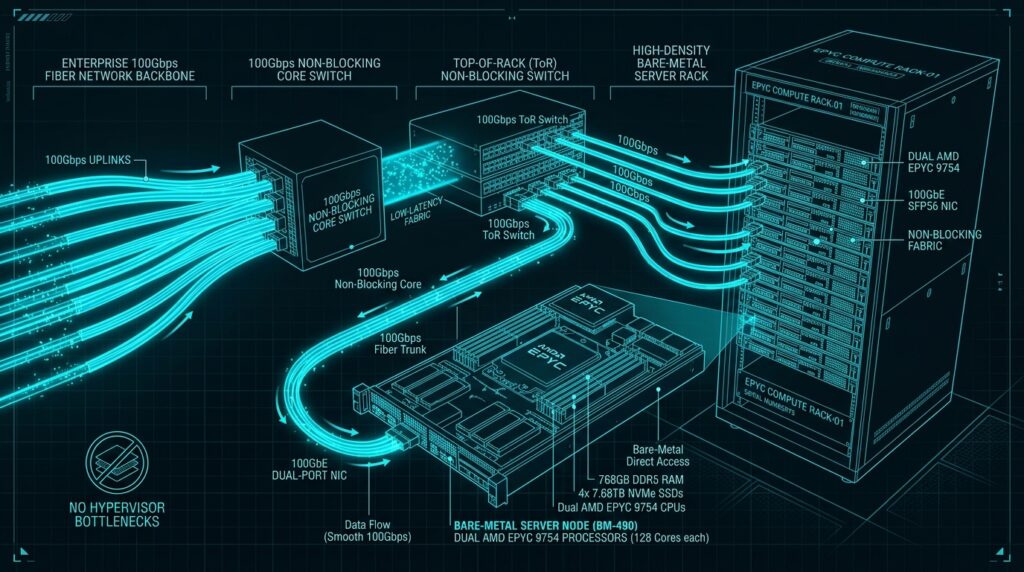
NovoServe operates a global carrier-neutral backbone powered by Arista 100 GE switches, yielding a total network capacity over 16 Tbps. Running under Autonomous System Numbers AS60068 (Europe) and AS939 (North America), the network connects directly to over 10 Tier-1 transit providers and 800+ peering partners, including major exchanges like AMS-IX and low-latency routes to Cloudflare and Google.
NovoServe assigns dedicated, non-blocking ports ranging from 1 Gbps up to 100 Gbps per server node. The platform operates on a truly unmetered flat-rate bandwidth model. Unlike hosts that use hidden soft caps, fair-use throttling, or speed degradation when links are maxed out, NovoServe allows servers to run at full port capacity 24/7/365 without overage fees or artificial traffic shaping.
Operations and Compliance
NovoServe hosts servers in Tier-III data centers powered by 100% renewable energy across the Netherlands, Denmark, and the United States. Operations comply with ISO 27001, PCI DSS, GDPR, and FISMA standards.
Infrastructure management includes automated telemetry monitoring. The system tracks real-time health metrics across storage arrays, allowing field engineers to identify and replace failing drives before an actual disk failure occurs. You maintain full operational control through out-of-band IPMI interfaces for hardware KVM access, power cycles, and custom ISO deployments.
Hetzner: Budget Dedicated Hardware Trade-Offs
Hetzner offers affordable bare-metal servers out of its European and US facilities. While it delivers strong compute performance per dollar, its bandwidth mechanics, network caps, and service support introduce operational trade-offs for high-traffic platforms.
The 10 Gbps Network Bottleneck
Hetzner’s standard server lines (EX, AX, PX, SX) include a default 1 Gbps network connection. While advertised as unlimited, running high sustained throughput (e.g., above 200–250 TB per month) on a standard 1 Gbps port often triggers administrative flags or port clamping due to internal rack contention.
To get reliable multi-gigabit throughput, engineering teams must purchase an optional 10 Gbps uplink upgrade (around €43.00/month plus setup fees and rack migration requirements). However, enabling this upgrade changes your bandwidth terms:
- Strict Transfer Caps: The standard unlimited policy is replaced with a 20 TB monthly outbound egress allowance.
- Overage Charges: Egress beyond the 20 TB allowance is billed at €1.00 per TB (~$1.20/TB).
- Internal Network Dependencies: You cannot upgrade a server’s internal interface to 10 Gbps for fast intra-datacenter traffic (like database syncs or storage replication) without purchasing the public 10 Gbps uplink upgrade for every machine in that private network.
- Disabled Edge Features: Activating a 10 Gbps uplink disables automated hardware firewall protections like the Hetzner Robot Firewall.
Customization and Support SLAs
Hetzner uses standardized, pre-built hardware templates. This approach keeps base prices low, but restricts custom hardware configurations. If your stack needs specialized SAS RAID controllers, dense direct-attached storage (DAS), or custom multi-socket AMD EPYC setups, Hetzner’s catalog falls short.
Additionally, Hetzner does not offer binding uptime SLAs on standard lines. Support operates via a ticket system; while hardware replacements are fast once confirmed, off-peak response times and network routing incidents lack enterprise-grade service level guarantees.
DigitalOcean: Virtualization Overhead and “Cloud Tax”
DigitalOcean built its platform around developer usability, fast virtual machine provisioning, and simplified APIs. However, running bandwidth-heavy or compute-intensive workloads on virtualized cloud instances introduces performance overhead and compounding monthly fees.
Hypervisor Delays and Noisy Neighbors
DigitalOcean Droplets rely on KVM hypervisors running on shared physical servers. On shared-CPU tiers, your virtual machine competes with other tenants for physical processing cycles. This shared structure can introduce CPU steal time, cache clearing delays, and inconsistent query runtimes.
VIRTUALIZED HYPERVISOR LAYER:
[ Droplet 1 ]   [ Droplet 2 ]   [ Droplet 3 ]
      │               │               │
      └───────────────┼───────────────┘
                      ▼
            [ KVM Hypervisor Layer ]
                      │
                      ▼ (Resource Contention / Steal Time)
          [ Shared Physical Hardware ]
Even on Dedicated-CPU Droplet tiers (General Purpose or CPU-Optimized), disk I/O and network traffic flow through virtual software emulation layers. Benchmark tests show that virtualized storage and memory access introduce latency jitter and random IOPS caps compared to native physical hardware.
Bandwidth Allowances and Ancillary Surcharges
DigitalOcean uses a metered bandwidth model. Every Droplet includes a fixed monthly outbound bandwidth allowance (ranging from 500 GB on small instances up to 4 TB on production nodes). Outbound transfer beyond your pooled allowance incurs a penalty of $0.01 per GiB, which equals $10.24 per TiB ($10.00/TB).
Building production architectures on DigitalOcean also requires paying for platform add-ons that add up quickly:
- Weekly Automated Backups: Adds a 20% surcharge to base Droplet costs.
- Daily Automated Backups: Adds a 30% surcharge to base Droplet costs.
- Managed Load Balancers: Starts at $12.00/month per instance.
- Block Storage Volumes: Billed at $0.10 per GB/month ($100/TB).
- System Snapshots: Billed at $0.06 per GB/month ($60/TB).
These cumulative fees—often called the “Cloud Tax”—cause monthly costs to scale dramatically alongside your data volume.
Editor’s Perspective: The Network Bottleneck
The biggest operational risk in infrastructure planning isn’t running out of CPU cycles—it’s unpredictable network costs. Many teams migrate to the cloud for fast deployments, only to find that their monthly network egress bill eclipses their compute spending. If your application moves data continuously, choosing a host with true unmetered bandwidth is the single most effective way to protect your operating margins.
Network Egress & TCO Financial Analysis
To evaluate how bandwidth pricing impacts your bottom line, we can model overall monthly infrastructure costs mathematically. The total cost ($C_{\text{total}}$) across any host combines base compute costs ($C_{\text{compute}}$), platform add-ons ($C_{\text{addons}}$), and egress overage fees:
$$C_{\text{total}} = C_{\text{compute}} + C_{\text{addons}} + \max(0, E_{\text{actual}} – E_{\text{included}}) \times P_{\text{overage}}$$
Where:
- $E_{\text{actual}}$ is total monthly outbound traffic in Terabytes (TB).
- $E_{\text{included}}$ is included outbound data transfer allowance in Terabytes (TB).
- $P_{\text{overage}}$ is the price charged per Terabyte beyond $E_{\text{included}}$.
Provider Financial Functions
1. NovoServe Flat-Rate Model
NovoServe offers unmetered dedicated ports without data caps or overage charges ($P_{\text{overage}} = 0$). Monthly infrastructure costs remain fixed regardless of total bandwidth used up to full port capacity ($C_{\text{port}}$):
$$C_{\text{NovoServe}} = C_{\text{compute}} + C_{\text{port}}$$
$$\forall E_{\text{actual}} \le E_{\text{port\_capacity}}, \quad \frac{d C_{\text{NovoServe}}}{d E_{\text{actual}}} = 0$$
2. Hetzner 10 Gbps Uplink Model
Upgrading a Hetzner server to a 10 Gbps port adds a fixed uplink fee ($C_{10\text{G}} = \text{€}43.00$), limits included egress to 20 TB ($E_{\text{included}} = 20$), and charges $P_{\text{overage}} = \text{€}1.00/\text{TB}$ for excess transfer:
$$C_{\text{Hetzner\_10G}} = C_{\text{compute}} + C_{10\text{G}} + \max(0, E_{\text{actual}} – 20) \times 1.00$$
3. DigitalOcean Cloud Droplet Model
DigitalOcean includes an egress allowance ($E_{\text{included}} = 5\text{ TB}$ on dedicated 8 vCPU instances). Transfer past this allowance costs $P_{\text{overage}} = \$10.24/\text{TB}$. Adding basic production requirements (like 20% automated backups and a $12/month load balancer) yields:
$$C_{\text{DigitalOcean}} = (1.20 \times C_{\text{droplet}}) + C_{\text{LB}} + \max(0, E_{\text{actual}} – E_{\text{included}}) \times 10.24$$
Monthly Cost Breakdown Across Egress Profiles
The model below compares an enterprise configuration requiring an 8-core / 8 vCPU processor, 32 GB RAM, enterprise NVMe storage, load balancing, and automated backups across four monthly egress volumes: 50 TB, 100 TB, 250 TB, and 500 TB.
(EUR to USD conversion rate estimated at €1.00 = $1.08 USD).

| Monthly Egress Workload | NovoServe (Unmetered 10G Dedicated) | Hetzner Dedicated (10G Uplink) | DigitalOcean (Dedicated CPU Droplet) |
| Base Hardware Specs | 8-Core Bare Metal, 32GB RAM, NVMe, Dedicated 10G Port | 8-Core Bare Metal, 32GB RAM, NVMe, 10G Uplink Upgrade | 8 vCPU Cloud Node, 32GB RAM, NVMe |
| Base Cost + Add-ons | ~$220.00 / mo (Flat 10G Unmetered + Full Control) | €138.00 / mo (~$149.00) (€95 Base + €43 10G Uplink) | $210.00 / mo ($165 VM + $33 Backups + $12 Load Balancer) |
| Included Egress | Unlimited / Unmetered | 20 TB Outbound Allowance | 5 TB Outbound Allowance |
| Scenario A: 50 TB/mo | |||
| • Overage Volume | 0 TB | 30 TB | 45 TB |
| • Overage Fees | $0.00 | €30.00 (~$32.40) | $460.80 (45 TB × $10.24) |
| • Total Monthly Cost | $220.00 | $181.40 | $670.80 |
| Scenario B: 100 TB/mo | |||
| • Overage Volume | 0 TB | 80 TB | 95 TB |
| • Overage Fees | $0.00 | €80.00 (~$86.40) | $972.80 (95 TB × $10.24) |
| • Total Monthly Cost | $220.00 | $235.40 | $1,182.80 |
| Scenario C: 250 TB/mo | |||
| • Overage Volume | 0 TB | 230 TB | 245 TB |
| • Overage Fees | $0.00 | €230.00 (~$248.40) | $2,508.80 (245 TB × $10.24) |
| • Total Monthly Cost | $220.00 | $397.40 | $2,718.80 |
| Scenario D: 500 TB/mo | |||
| • Overage Volume | 0 TB | 480 TB | 495 TB |
| • Overage Fees | $0.00 | €480.00 (~$518.40) | $5,068.80 (495 TB × $10.24) |
| • Total Monthly Cost | $220.00 | $667.40 | $5,278.80 |
MONTHLY COST VS. EGRESS VOLUME (50 TB TO 500 TB)

  $6,000 ───────────────┬────────────────────────────────────────── DigitalOcean
                        │                                         / (Scales up to $5,278.80)
  $4,000 ───────────────┼────────────────────────────────────────/
                        │                                       /
  $2,000 ───────────────┼──────────────────────────────────────/
                        │                                    /
    $500 ───────────────┼───────────────── Hetzner ─────────/─── (Scales to $667.40)
      $0 ───────────────┴───────────────── NovoServe ──────────────── (Stays Flat at $220.00)
                      50 TB               250 TB             500 TB
Financial Analysis Findings
- DigitalOcean’s Egress Penalty: As egress grows from 50 TB to 500 TB per month, DigitalOcean overage fees increase to make up over 96% of the total monthly bill. At 500 TB, running a single node on DigitalOcean costs $5,278.80 per month—24x more expensive than NovoServe’s fixed $220.00 rate.
- Hetzner 10G Cost Crossover: At low transfer volumes (50 TB/month), Hetzner’s lower base pricing yields a smaller initial invoice ($181.40 vs. NovoServe’s $220.00). However, because Hetzner charges €1.00/TB past 20 TB on 10G links, the cost lines cross around 85 TB/month. Beyond 85 TB, NovoServe becomes cheaper. At 500 TB/month, Hetzner costs $667.40—over 3x the cost of NovoServe.
- Budget Predictability: For streaming origin servers, ad tech delivery platforms, remote backup nodes, and MSP backbones, NovoServe’s unmetered model eliminates unexpected cost spikes. Your infrastructure bill stays flat even during sudden traffic surges or sustained full-port utilization.
Real-World Consideration: Operational Risk
Choosing a cheaper entry price often introduces operational compromises elsewhere. If your team selects Hetzner to save $38/month at low bandwidth, ensure your engineers can manage manual hardware recovery during outages without an enterprise SLA. If you choose DigitalOcean for ease of use, implement budget alerts to catch bandwidth overages before they hit your invoices.
Enterprise Verdict & Buyer Guidelines
Selecting the right infrastructure host requires matching your workload’s network throughput, CPU performance, and hardware access against your monthly operating budget.
Workload Decision Framework
| Primary Workload Requirement | Optimal Provider Choice | Strategic Architectural Justification |
| Sustained Egress > 85 TB/Month | NovoServe | Flat-rate unmetered bandwidth prevents cost spikes and preserves operating margins. |
| High-Density Storage (up to 800 TB) | NovoServe | Direct-attached Supermicro/HPE chassis accommodate up to 36 drive bays and NVMe flash tiers per node. |
| Dedicated Physical Isolation | NovoServe / Hetzner | Pure bare metal removes hypervisor delays, CPU steal time, and multi-tenant resource interference. |
| Low-Egress European Hosting (< 20 TB) | Hetzner | Highly economical base hardware pricing for low-traffic tasks staying within standard bandwidth caps. |
| Fast Prototyping & Staging | DigitalOcean | Rapid API provisioning, cloud dashboards, and developer tooling for non-bandwidth-heavy projects. |
Final Recommendations
Choose NovoServe if:
- You run high-throughput egress workloads: Your platform transmits sustained outbound traffic exceeding 85 TB to 500+ TB per month per server (e.g., OTT video, live streaming, game backends, media CDNs).
- You need single-tenant compute performance: Your applications require direct access to physical CPU cores, PCIe lanes, and NVMe arrays without hypervisor jitter.
- You require high-density storage arrays: Your architecture uses multi-drive setups requiring custom chassis with up to 800 TB of raw SAS/SATA/NVMe storage in a single chassis footprint.
- You operate under strict compliance mandates: Your industry requires isolated physical hardware hosted in Tier-III facilities built to ISO 27001, PCI DSS, GDPR, or FISMA standards.
- You need fixed, predictable budgets: Your engineering leadership needs fixed monthly infrastructure costs protected against overage fees and sudden traffic spikes.
Choose Hetzner if:
- You host low-egress European workloads: Your applications run on tight budgets where raw CPU core density per dollar is your primary metric and binding uptime SLAs aren’t required.
- Your bandwidth stays within fixed limits: Outbound traffic remains under the 20 TB monthly limit on 10 Gbps uplinks, or runs on standard 1 Gbps connections without triggering fair-use policy flags.
- You manage infrastructure in-house: Your engineering team can handle server recoveries, manual networking updates, and hardware troubleshooting via rescue consoles without dedicated account support.
Choose DigitalOcean if:
- You need fast developer tooling and staging environments: Your team prioritizes rapid VM deployments, CLI automation, and simple management dashboards for development workflows or MVPs.
- Your applications consume minimal bandwidth: You run lightweight microservices, internal backends, or low-traffic API endpoints where outbound transfer stays well within included 500 GB to 4 TB monthly limits.
- You rely on managed cloud services: Your stack relies on managed Kubernetes (DOKS), managed databases, or container platforms where hypervisor abstraction speeds up initial development cycles.
To evaluate how single-tenant bare-metal dedicated servers fit into broader enterprise infrastructure, explore our technical benchmarks and ecosystem reviews across AI compute, on-premise platforms, and edge automation:
- AI Compute & Private Platforms: For hardware selection required to host local LLM inference engines with low latency and predictable costs, analyze our benchmark on the Top 5 On-Premise AI Platforms, alongside deep-dives into DeepSeek-R1 Hardware Review, SambaNova SN40L RDU Review, and turnkey enterprise appliances in the HPE Private Cloud AI Review.
- Edge Deployments & Orchestration: For edge-based AI architectures, see our hands-on analysis of Qualcomm Dragonwing IQ-9075 Review and Qualcomm Dragonwing AI Review. You can also evaluate workflow orchestration in Dynamiq AI Review, cognitive document extraction strategies in ICR vs Multimodal LLMs Strategy, and enterprise automation platforms like E42.ai Review.
- Enterprise CRM & RPA Solutions: For front-office CRM automation, check out our HubSpot Enterprise AI Review. For legacy RPA benchmarks and self-hosted infrastructure alternatives, read our ElectroNeek On-Premise Review, Top 5 Zanus AI Alternative, Zanus AI Deployment, and Zanus AI for Construction. Bookmark AI Review Zones for continuous developer tooling and AI infrastructure coverage.
References
- NovoServe BV — High-Capacity Dedicated Storage & Unmetered Network Specification Sheets
[https://www.novoserve.com/](https://www.novoserve.com/) - Hetzner Online GmbH — Dedicated Server Specifications, 10G Uplink Policies & Network Terms
[https://docs.hetzner.com/robot/dedicated-server/network/10g-uplink/](https://docs.hetzner.com/robot/dedicated-server/network/10g-uplink/) - DigitalOcean LLC — Droplet Pricing, Bandwidth Allowance & Egress Overage Documentation
[https://www.digitalocean.com/pricing/droplets](https://www.digitalocean.com/pricing/droplets) - Arista Networks — 100G Enterprise Data Center Switching Systems & Network Topologies
[https://www.arista.com/en/products/7050x3-series](https://www.arista.com/en/products/7050x3-series) - International Organization for Standardization (ISO) — ISO/IEC 27001:2022 Information Security Management Standards
[https://www.iso.org/standard/27001](https://www.iso.org/standard/27001) - PCI Security Standards Council — PCI Data Security Standard (PCI DSS) Requirements v4.0
[https://www.pcisecuritystandards.org/](https://www.pcisecuritystandards.org/)