
1. Quick Summary & Verdict: Scaling B2B Outreach in High-Value Sectors
When conducting an independent Woodpecker.co review and evaluating commercial sales infrastructure, commercial construction, specialty subcontracting, and supply chain logistics have historically relied on offline relationships, warm phone calls, tradeshow networking, and static bid boards. However, market shifts in 2026 have forced enterprise growth teams to modernize their client acquisition infrastructure. General Contractors (GCs) sourcing qualified trade partners, supply chain executives securing freight contracts, and commercial subcontractors pitching developers now require scalable, highly personalized, and deliverability-protected cold outreach pipelines.
Transitioning from manual cold calling to automated multi-channel sequences presents significant technical risks. Domain blacklisting, improper DNS authentication, and generic mass messaging can permanently damage organizational email reputations. Enterprise outreach in high-value sectors demands system architectures built specifically to simulate organic human activity, maintain high deliverability across strict enterprise spam filters such as Microsoft Exchange and Google Workspace, and handle multi-touch follow-up cycles spanning several weeks.
Woodpecker.co, founded in 2015 in Wrocław, Poland, stands out as an enterprise-grade cold email and multi-channel sales engagement platform engineered around deliverability, inbox safety, and account-based sales execution. Unlike legacy platforms that charge per seat or volume-blasted email count, Woodpecker’s operational engine uses a unique usage model based on unique contacted prospects per month.
Buying Verdict for Enterprise Teams
Woodpecker is recommended for B2B sales organizations, General Contractors running regional Request for Proposal (RFP) bidding invitations, and logistics agencies requiring high deliverability, granular conditional sequence logic, and multi-inbox safety. It is less suitable for high-volume consumer blasts or teams seeking an all-in-one CRM with built-in phone dialers. For B2B outbound teams managing contract values from $50,000 to over $1,000,000, Woodpecker delivers a strong return on investment (ROI) by safeguarding corporate domains while automating outreach pipelines.
| Feature Category | Assessment | Strategic Value for High-Value Sectors |
| Deliverability Engine | Exceptional | Built-in catch-all email verification, provider matching, adaptive sending algorithms, and automated domain monitoring prevent spam placement. |
| Sequence Flexibility | High | Dynamic snippet fallbacks and conditional branching allow complex, personalized bidding and RFP workflows. |
| Multi-Channel Capability | Moderate-High | Native LinkedIn automation (connection requests, profile visits, InMails) paired with manual call tasks. |
| Scalability & Agency Support | Superior | Dedicated multi-client agency dashboards and unlimited email account connections per slot optimize team scaling. |
| Pricing Predictability | Moderate | Usage-based pricing on unique prospects contacted protects multi-touch sequence budgets, though mid-tier jump costs require plan optimization. |
Operational Impact: The Cost of Improper Deliverability
For an enterprise handling multi-million-dollar commercial bids, a burned domain is not just a technical nuisance—it is a direct revenue bottleneck. If your primary sending domain lands on a global blocklist, submittal invitations stop reaching general contractors, and bid opportunities evaporate overnight. Platforms prioritizing raw volume over deliverability protection introduce unacceptable operational risk to high-value outbound operations.
🎯 Executive Summary: Why B2B Growth Teams Choose Woodpecker
Woodpecker protects corporate domain reputations while automating cold email and LinkedIn sequences. Pay only for unique prospects contacted—never per email sent or team seat.
2. Woodpecker.co Technical Architecture & Deliverability Engine
Advanced Email Deliverability Safeguards
Woodpecker’s architecture prioritizes domain health and inbox placement. Modern email security gateways employ machine-learning models to analyze sending patterns, server origins, and recipient interaction rates. Woodpecker mitigates spam flags through several automated deliverability controls:
- Humanized Adaptive Sending: Woodpecker avoids artificial batch sending by generating randomized time gaps between individual email transmissions. Outreach managers can set precise daily limits on primary opening messages, such as capping step-one emails at 50 per day per mailbox. The adaptive sending engine continuously monitors bounce rates and blocklist appearances, throttling output automatically if security gateways show warning signs.
- Native Pre-Send Verification: In construction and logistics, domain servers frequently operate catch-all configurations that accept messages initially but bounce them silently later. Woodpecker integrates native pre-send email verification powered by Bouncer. Every list uploaded undergoes real-time checks prior to campaign launch, removing invalid addresses and protecting domain reputation from hard bounces.
- Peer-to-Peer Provider Matching: To minimize security scrutiny, Woodpecker automatically routes outbound emails through matching infrastructure when multiple inboxes are connected—sending Google-to-Google and Microsoft-to-Microsoft whenever recipient MX records allow. This peer-to-peer sending behavior significantly boosts inbox placement rates.
- Automated DNS Protocol Monitoring: The platform continuously verifies mandatory email authentication protocols, including Sender Policy Framework (SPF), DomainKeys Identified Mail (DKIM), and Domain-based Message Authentication, Reporting, and Conformance (DMARC). If structural misconfigurations or domain warm-up drifts occur, system alerts flag administrative teams before campaigns execute.
Conditioning & Personalization Architecture
Enterprise outreach mandates high relevance. Generic templates fail when pitching commercial developers or soliciting bids from trade contractors. Woodpecker uses an advanced variable and conditional logic engine to maintain communication quality at scale.
Dynamic Custom Fields & Snippet Fallbacks
When importing complex prospect lists containing project specs, square footage, or division codes, missing data fields can break regular copy templates. Woodpecker solves this using fallback syntax directly inside the campaign editor. For instance, a variable structured as {{FIRST_NAME | "there"}} ensures that if a prospect’s first name is missing, the greeting seamlessly defaults to “Hey there” instead of failing or pausing the email with missing snippet errors. Fallback values can be customized per campaign step without altering the source CSV files.
Snippet-Based Conditional Branching
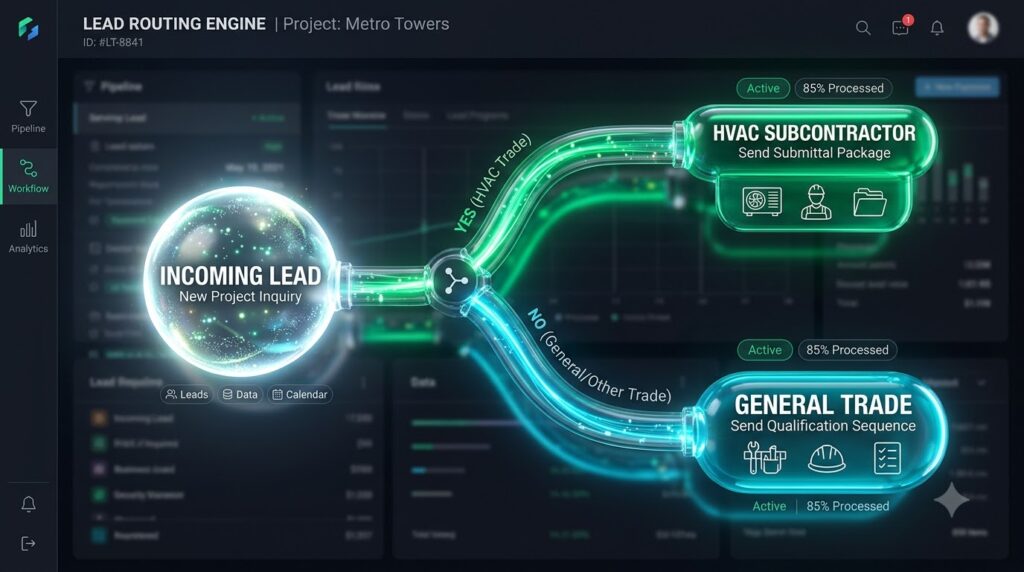
Outreach sequences can branch into distinct paths based on specific prospect data attributes. Campaign architects can build If/Else logic triggered when a prospect field equals, contains, or is not empty.
The decision workflow operates through a structured sequence evaluation:
- Prospect Data Ingestion: The platform evaluates incoming prospect attributes against configured snippet rules.
- Condition Evaluation: Woodpecker checks whether a designated variable (e.g., custom field
Trade) equals or contains a specific string such as “HVAC”. - Path Routing: Prospects matching the condition are routed down Path YES, receiving specialized outreach detailing HVAC tender packages, submittal criteria, and technical bid schedules. Prospects failing the condition route to Path NO, receiving a standard trade qualification sequence.
This structural execution guarantees that specialized subcontractors receive project-relevant documentation while general contacts receive broader introductory sequences.
Timezone-Aware Sending Windows
Woodpecker enables sending hours configured around recipient local time zones. Outreach managers can establish up to three custom sending windows per day (e.g., 07:30 AM – 09:00 AM, 11:30 AM – 01:00 PM, and 04:00 PM – 05:30 PM) to hit decision-makers during high-engagement periods.
Multi-Channel Sequences
Modern outreach relies on a balanced blend of channels rather than cold email alone. Woodpecker supports multi-channel sequences by unifying cold email, LinkedIn automation, and manual tasks into a single automated pipeline.
A representative high-value sequence progresses across multiple channels over a two-week window:
- Day 1: Initial Cold Email delivering the RFP invitation and project scope documents.
- Day 2: Automated LinkedIn Profile Visit to establish soft brand exposure.
- Day 4: Automated LinkedIn Connection Request with a personalized note referencing the sent RFP email.
- Day 6: System check for recipient engagement. If the prospect replies, the sequence automatically pauses to prevent further automated touchpoints.
- Day 7: If no reply is detected, Step 2 Cold Email triggers, providing updated project timelines.
- Day 9: A manual task generates within the dashboard, instructing the sales representative to execute a phone call or dispatch direct site documentation.
LinkedIn automation steps include automated profile visits, connection requests, direct messaging, and InMail delivery. These actions execute using dedicated connected accounts operating within safe daily volume parameters (e.g., capping free/standard accounts at 25 connection requests per day, and Sales Navigator accounts at 30 requests and up to 500 profile visits daily). Manual task steps generate real-time operational notifications, prompting sales representatives to conduct phone calls, issue site invites, or send direct mail proposals right when engagement spikes.
Editor’s Perspective: The Limits of Automation
While multi-channel sequences drastically improve engagement, automation should never be treated as a total replacement for human oversight. In complex B2B environments, automated LinkedIn actions can feel robotic if message templates lack industry context. Furthermore, running multi-channel campaigns requires strict adherence to network limits—over-automating LinkedIn interactions can result in temporary account restrictions. The most effective strategy uses Woodpecker to handle predictable touchpoints while reserving manual tasks for high-value follow-ups.
🎯 Executive Summary: Why B2B Growth Teams Choose Woodpecker
Woodpecker protects corporate domain reputations while automating cold email and LinkedIn sequences. Pay only for unique prospects contacted—never per email sent or team seat.
3. Industry Specific Deep-Dive: Woodpecker for Construction & Subcontractor Outreach
Operational Blueprints for High-Value Sectors
Commercial General Contractors (GCs)
General Contractors frequently manage tight bidding windows requiring bids across 20 to 30 trade divisions (e.g., steel framing, MEP, concrete, masonry). Using Woodpecker, GCs automate RFP distributions by segmenting vendor lists using custom snippets like {{DIVISION_CODE}}, {{PROJECT_NAME}}, and {{BID_DUE_DATE}}. Conditional logic checks whether a trade partner holds union or non-union credentials, routing them to the correct compliance documentation automatically.
Specialty Subcontractors
Subcontractors targeting enterprise GCs use multi-channel sequences to monitor upcoming commercial permits and land development approvals. An initial email delivers company capability statements and bonding capacities, followed two days later by an automated LinkedIn connection request from the Chief Estimator. If the GC opens the email but does not reply, a manual call task prompts the subcontractor’s estimating team to follow up directly on active tender boards.
Supply Chain & Third-Party Logistics (3PL)
3PL providers and freight brokers operating in highly competitive markets use Woodpecker’s provider matching and inbox rotation to prospect fleet managers and shipping directors. By distributing sending volumes across 15 distinct email accounts, logistics teams run high-volume regional campaigns without exceeding safe daily sending thresholds per mailbox.
Agency & Multi-Account Management
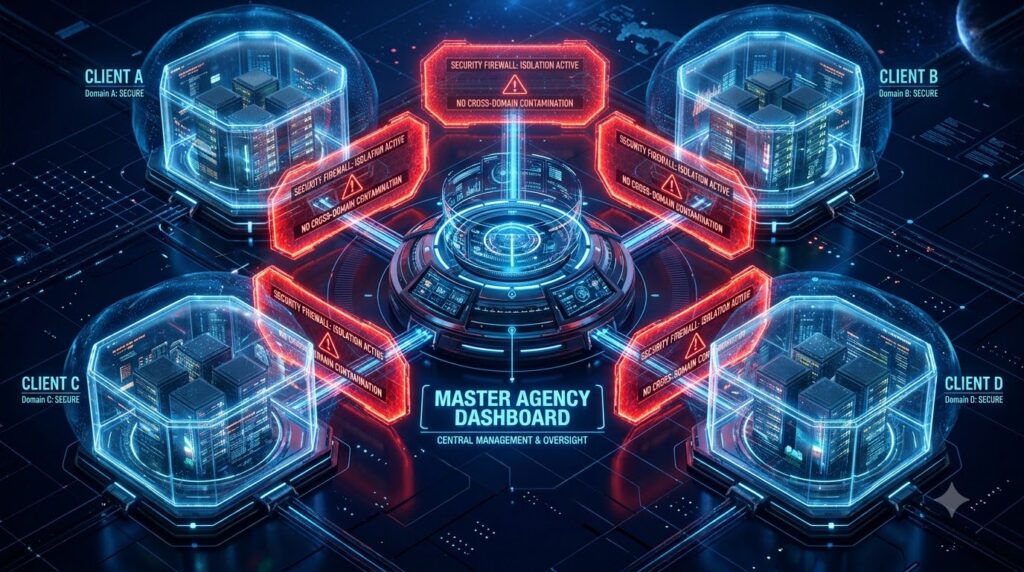
Growth agencies and corporate marketing departments managing outreach across multiple operating units or subsidiary brands face severe risks if sending domains share technical infrastructure. Cross-domain spam contamination occurs when one poorly managed domain burns an IP or tracking link, degrading deliverability for connected domains.
Woodpecker eliminates this issue through its dedicated Agency Panel ($27 per active client per month). This system provides centralized management with fully isolated campaign environments. The operational layout relies on a secure multi-tenant structure:
| Architectural Layer | Operational Component | Function & Security Isolation |
| Master Administrative Level | Agency Master Dashboard | Controls client billing, user permissions, global analytics, and administrative access. |
| Tenant Isolation Level | Client Workspaces | Completely segregates sending domains, prospect databases, campaign rules, and compliance settings. |
| Execution Sending Level | Dedicated Mailbox Pools | Distributes campaign sends across dedicated, domain-specific mailboxes with isolated domain reputations. |
Admins set user permission levels, control billing allocations, and monitor domain health metrics across hundreds of client accounts from a single master dashboard. Dedicated tracking domains and separate mailbox provisions ensure that deliverability issues on one account never impact neighboring domains.
Real-World Consideration: Operational Bottlenecks in Trade Sourcing
The primary bottleneck in construction outreach isn’t reaching out—it’s managing incoming responses. When a General Contractor sends 500 bid invitations simultaneously, receiving dozens of replies, submittal questions, and scope clarifications within hours can overwhelm estimators. Outbound automation solves top-of-funnel reach, but teams must have unified inbox protocols and CRM workflows ready to parse, qualify, and action incoming interest immediately.
🎯 Executive Summary: Why B2B Growth Teams Choose Woodpecker
Woodpecker protects corporate domain reputations while automating cold email and LinkedIn sequences. Pay only for unique prospects contacted—never per email sent or team seat.
4. Woodpecker Pricing Structure & Value Breakdown
Transparent Tier Breakdown
Woodpecker transitioned its core platform to a usage-based slider model centered around unique prospects contacted per month. Unlike subscription models that force upgrades when adding sending mailboxes or team seats, Woodpecker includes unlimited email accounts and unlimited team members on its core plans.
The fundamental pricing driver is the contacted prospect threshold: an outreach sequence can send ten automated follow-ups to a single contact over a 60-day period, but the account is billed for only one single contacted unit.
| Subscription Tier & Add-On Modules | Standard Monthly Cost | Annual Billing Cost (Equivalent) | Key Feature Inclusions & Operational Limits |
| Starter / Entry Plan | ~$35 / mo | ~$23 / mo | 500 contacted prospects, 16K emails/mo, 4K stored prospects, 2–4 warmup slots, unlimited mailboxes, unlimited team seats. |
| Growth Plan | ~$188 / mo | ~$126 / mo | 10,000 contacted prospects, 120K emails/mo, 40K stored prospects, 20 warmup slots, condition-based branching. |
| Scale Plan | ~$1,354 / mo | ~$903 / mo | 100,000 contacted prospects, 1.2M emails/mo, 400K stored prospects, 135 warmup slots, priority support. |
| Add-On: LinkedIn Automation | +$29 / mo per account | +$29 / mo per account | Unlocks automated profile visits, connection requests, direct messaging, and InMails. |
| Add-On: API & Webhooks Access | +$20 / mo total | +$20 / mo total | Unlocks full API integration, custom webhooks, and MCP server connectivity across campaigns. |
| Add-On: Extra Warm-Up Slots | +$5 / mo per inbox | +$5 / mo per inbox | Provides automated email warm-up for mailboxes exceeding the plan’s baseline inclusions. |
| Add-On: Agency Panel | +$27 / mo per client | +$27 / mo per client | Centralized multi-client management dashboard with isolated domain security controls. |
| Add-On: Managed Mailboxes | +$4 to $6 / mo per inbox | +$4 to $6 / mo per inbox | In-app provisioning for Google/Microsoft ($6/mo) or Maildoso/Infraforge ($4/mo) with auto-DNS setup. |
Hidden Cost Evaluation & Market Comparison
A common challenge in evaluating cold outreach software is identifying hidden operational expenses. Platforms charging per email sent incentivize short, aggressive single-touch campaigns that hurt response rates. Conversely, platforms charging per user seat (such as Mailshake at $99/seat/month) create cost bottlenecks when scaling sales teams.
Woodpecker’s contact-centric pricing keeps cost structures predictable for long, complex follow-up campaigns. For example, sending a 6-step cold email campaign to 2,000 high-value commercial developers equates to 12,000 total email sends. Under traditional volume-per-send pricing, software costs scale with every follow-up. Under Woodpecker, the outreach costs remain locked at the 2,000 prospect pricing tier, regardless of sequence length.
However, buyers must account for add-on expenses. Teams requiring custom CRM integrations via API must budget an extra $20/month. Similarly, integrating five LinkedIn accounts adds $145/month ($29 per account) to the core subscription. Another key structural factor is the gap between the 500-prospect Starter plan ($35/mo) and the 10,000-prospect Growth tier ($188/mo); teams contacting 1,500 prospects per month must step up to the 10,000-prospect tier.
ROI Analysis for High-Value B2B Contracts
In commercial construction, logistics, and industrial services, contract values are substantial. Evaluating outbound software against deal economics highlights the immediate return on investment.
Consider an enterprise outbound setup where an organization subscribes to the Growth plan with the API add-on, executing outreach to 10,000 targeted commercial contacts across a 12-month period:
$$\text{Annual Investment} = (\$188 \times 12) + (\$20 \times 12) = \$2,256 + \$240 = \$2,496\text{ per year}$$
When evaluated against a single secured commercial contract valued at $50,000, the software amortization and return on investment demonstrate strong fiscal efficiency:
$$\text{Software Amortization Rate} = \frac{\text{Total Annual Software Investment}}{\text{Gross Revenue from Single Closed Deal}}$$
$$\text{Software Amortization Rate} = \frac{\$2,496}{\$50,000} = 4.992\% \quad (\approx 20.03\times\text{ Coverage / } 2,003\%\text{ ROI})$$
For a specialty subcontractor securing a $250,000 commercial fit-out contract via an automated RFP campaign, the annual software investment is amortized by over 100x, proving that deliverability protection far outweighs baseline software costs.

Editor’s Take: Evaluating the Growth Tier Step-Up
If your monthly outreach contacts hover between 1,000 and 2,000 prospects, the jump from $35/mo to $188/mo can feel steep. However, attempt to look past the tier increase itself and evaluate the deliverability value. In high-stakes B2B sales, paying an extra $150 per month to maintain dedicated inbox warmup, domain isolation, and condition-based branching is negligible compared to the financial loss of having a corporate domain flagged as spam.
🎯 Executive Summary: Why B2B Growth Teams Choose Woodpecker
Woodpecker protects corporate domain reputations while automating cold email and LinkedIn sequences. Pay only for unique prospects contacted—never per email sent or team seat.
5. Competitive Matrix: Woodpecker vs Instantly.ai vs Lemlist vs Outreach.io
| Performance Metric / Feature | Woodpecker.co | Instantly.ai | Lemlist | Outreach.io |
| Primary Billing Model | Unique Contacted Prospects | Uploaded Leads / Sends | Per User Seat | Per User Seat (Enterprise) |
| Deliverability Engine | Adaptive sending with bounce auto-stop | Static delay algorithms | Warm-up engine dependent | Enterprise gateway routing |
| Inbox Warm-Up Inclusion | 2–20+ slots included; $5/mo for extras | Unlimited warm-up included | Included in higher tiers | No native warm-up (external) |
| Native Catch-All Email Verification | Yes (Built-in Bouncer verification) | Basic verification (add-on) | Basic verification (add-on) | Requires third-party integration |
| LinkedIn Multi-Channel Support | Yes ($29/mo per connected account) | Limited / Third-party | Native on higher plans | Full multi-channel platform |
| Conditional Branching (If/Else) | Yes (Snippet & interaction rules) | Basic linear steps | Advanced visual workflows | Enterprise workflow rules |
| Agency / Multi-Tenant Management | Excellent ($27/mo per client) | Good (Workspace-based) | Moderate | Enterprise workspace controls |
| Est. Monthly Cost (5K Contacts / 10 Inboxes) | ~$215 / month (Base + API + Warmups) | ~$97 to $197 / month | ~$240+ / month | ~$1,200+ / month (Enterprise) |
Pros & Cons Assessment
Strengths
- Deliverability Protection: Provider matching, catch-all verification, and adaptive sending significantly reduce spam rates.
- Contact-Based Billing: Charging by unique prospect rather than email volume supports complex follow-up strategies.
- Agency Architecture: The Agency Panel provides safe client segmentation and simple administrative scaling.
- Sequence Personalization: Advanced variable syntax and snippet fallbacks prevent campaign errors.
- Unlimited Seats & Accounts: Connect multiple mailboxes and add team members without per-seat charges.
Limitations
- Plan Gap Jump: Jumping from the Starter tier ($35/mo for 500 contacts) to the Growth tier ($188/mo for 10,000 contacts) leaves no mid-tier option for teams contacting 1,000 to 2,000 prospects per month.
- À La Carte Add-On Fees: Features like API access ($20/mo) and LinkedIn automation ($29/account/mo) must be purchased separately.
- No Native Lead Database Included: Unlike platforms offering built-in contact databases, Woodpecker requires external list sourcing or purchases through its Lead Finder add-on.
6. Final Verdict & Actionable Setup Guide
Woodpecker.co is a robust engagement engine for B2B organizations, General Contractors, and logistics firms closing high-value deals. By focusing on technical deliverability controls, intelligent conditional branching, and multi-inbox rotation, Woodpecker ensures outreach lands directly in primary inboxes.
Actionable 7-Day Domain Warmup & Campaign Execution Strategy
Executing cold outreach requires a systematic infrastructure setup. The roadmap below outlines operational steps to configure domains, validate target lists, and launch campaigns using Woodpecker.
| Execution Phase | Focus Area | Technical Execution & Configuration Steps |
| Day 1 | Domain & Authentication | Purchase secondary domains (e.g., build-brand.com). Configure DNS authentication records: SPF (v=spf1 include:_spf.google.com ~all), DKIM (2048-bit TXT key), and DMARC (v=DMARC1; p=none; rua=mailto:dmarc@brand.com). |
| Day 2 | Mailbox Provisioning | Provision 2–4 sending mailboxes per domain (e.g., john.m@build-brand.com). Connect mailboxes to Woodpecker via OAuth/SMTP. Activate Woodpecker Warm-up to begin automated 14-day sending warmups. |
| Day 3 | Custom Tracking Domain | Create custom CNAME tracking records (e.g., email.build-brand.com) pointing to Woodpecker’s tracking host. Enable SSL encryption inside Woodpecker settings to replace shared tracking domains. |
| Day 4 | List Scrubbing & Verification | Import target prospect lists into Woodpecker. Run automated catch-all email verification via Bouncer. Scrub all invalid, role-based (info@, sales@), or high-risk bounce addresses. |
| Day 5 | Sequence & Fallback Logic | Draft a 4-to-6 step sequence. Configure fallback variables (e.g., `{{FIRST_NAME |
| Day 6 | Multi-Channel & Timezones | Connect LinkedIn accounts for profile visits and connection requests. Set timezone-aware delivery windows (e.g., 07:30–09:00 AM and 11:30 AM–01:00 PM) matching prospect local times. |
| Day 7 | Campaign Launch & Throttling | Set conservative daily volume limits (20–30 opening emails per mailbox). Enable Inbox Rotation across all connected accounts. Launch campaign and monitor health: maintain open rates >40%, click rates >3%, and hard bounces <1%. |
🎯 Executive Summary: Why B2B Growth Teams Choose Woodpecker
Woodpecker protects corporate domain reputations while automating cold email and LinkedIn sequences. Pay only for unique prospects contacted—never per email sent or team seat.
🔍 Related Enterprise AI & Sales Automation Infrastructure Guides
For commercial contractors, B2B sales leaders, and IT executives evaluating sales technology, private AI servers, and software ROI, explore our related technical reviews and benchmarks:
- Construction Industry AI: Discover how local AI hardware streamlines estimating in Zanus AI Server for Construction & Contractors.
- Supply Chain Automation: Evaluate local AI integration for freight in Zanus AI Server for Supply Chain & Logistics.
- Multi-Entity Financial Reporting: Streamline accounting across companies in Joiin Review 2026: Multi-Entity Financial Reporting.
- AI Agent Software Costs: Analyze credit overages and voice surcharges in Is Lindy AI Worth It in 2026? Pricing & Alternatives.
- Hardware Pricing & ROI: Compare enterprise AI server tiers and payback models in Zanus AI Server Pricing Guide 2026.
References
- Woodpecker.co Official DocumentationHow to Set Delivery Time and Timezone in Woodpeckerhttps://help.woodpecker.co/en/articles/4802871-how-to-set-delivery-time-and-timezone
- Woodpecker.co Help CenterHow to Set Up Snippet Fallbacks for Email Personalizationhttps://help.woodpecker.co/en/articles/4802842-how-can-i-set-up-the-snippet-fallbacks
- Woodpecker.co Help CenterHow to Set Up a Snippet-Based Condition in Campaign Sequenceshttps://help.woodpecker.co/en/articles/5224329-how-to-set-up-a-snippet-based-condition
- Woodpecker.co Knowledge BaseLinkedIn Outreach Automation Guide & Safety Limitshttps://help.woodpecker.co/en/articles/5920042-linkedin-outreach-automation-in-woodpecker
- Capterra Software ReviewsWoodpecker.co Pricing, Features, and Enterprise Capabilities 2026https://www.capterra.com/p/153835/Woodpecker-co/pricing/
- Zapier Integration DirectoryConnecting Woodpecker.co with Enterprise CRMs & Lead Workflowshttps://zapier.com/apps/woodpecker/integrations