Most Homeowners Association (HOA) board managers don’t need another abstract tech report on artificial intelligence. They need a practical roadmap to solve real operational bottlenecks—like handling massive stacks of legal paperwork, managing resident disputes, and tracking endless maintenance tickets without drowning in administrative delays.
Managing a modern community is an administrative pressure cooker. Board members balance strict legal frameworks like the Fair Housing Act or the Davis-Stirling Act against an overwhelming volume of resident communications, CC&R violations, and architectural review requests. While cloud-based AI tools promise efficiency, they introduce major risks: volatile monthly token fees, unpredictable software budgets, and potential legal exposure from sending sensitive Personally Identifiable Information (PII) to public third-party servers.
Zanus AI offers a clean break from this dependency. As a completely private, on-premises artificial intelligence system, it runs entirely on specialized, local enterprise GPU hardware combined with localized Large Language Models (LLMs) and high-precision vector databases. It automates repetitive workflows locally without ever sending a single byte of data to the internet.
This professional deployment guide provides a step-by-step framework to set up, configure, and integrate Zanus AI for maximum operational efficiency.
1. Zanus AI Deployment Guide: Hardware Installation & HOA Workflow Automation
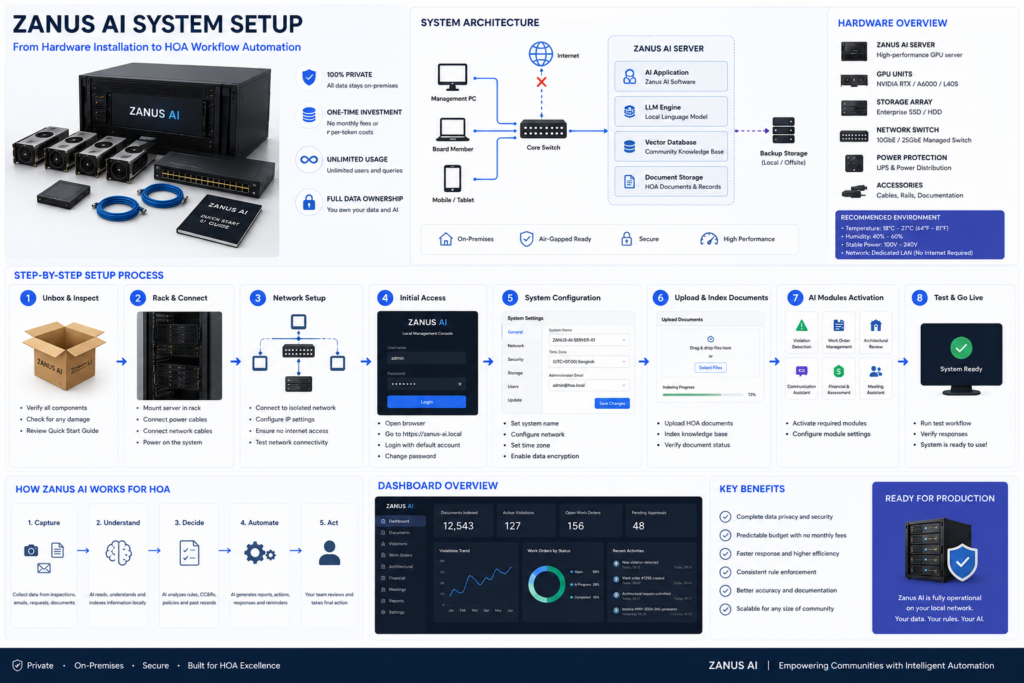
Zanus AI functions as an isolated, turnkey artificial intelligence operating system installed directly onto local hardware kept on-site. Unlike typical cloud SaaS models, it operates under a one-time capital investment model—offering lifetime ownership, offline functionality, total data sovereignty, and zero ongoing per-token usage fees.
Solving the Operational Bottlenecks of HOA Operations
Community managers frequently deal with staffing shortages and fragmented workflows. Zanus AI targets these specific friction points through its local system architecture:
- Absolute PII and Financial Privacy: Resident ledger histories, delinquency records, legal disputes, and personal contact details are highly sensitive. Cloud platforms strip you of data control. Zanus AI processes all data locally, completely neutralizing the risk of data leaks or third-party vendors scraping your records to train public models.
- Predictable Capital Budgeting: Traditional cloud AI solutions charge per-seat or per-token fees, making software expenditures highly unpredictable as communities scale. Zanus AI features a fixed asset cost, granting unlimited queries and support for an infinite number of system users without recurring monthly operational bills.
- Objective Rule Enforcement: Manual CC&R enforcement can occasionally lack consistency, leading to resident complaints about perceived bias or unfair treatment. Because Zanus AI evaluates violations strictly against a standardized database of local bylaws, it delivers objective, data-backed assessments that align directly with local regulations.
- Streamlined Vendor and Maintenance Routing: Categorizing repair requests, assessing emergency priority levels, and tracking down contractors manually consumes dozens of staff hours each week. Zanus AI dynamically scans open work orders, identifies overdue tasks, and schedules maintenance updates automatically.
Dedicated Modules for Property Management
Activating the Zanus AI Software for HOA & Property Management package initializes over 15 interconnected operational modules:
- AI Violation Detection & Tracking: Processes uploaded inspection imagery, matches observations against specific CC&R rules, and logs organized violation profiles automatically.
- Assessment & Dues Billing Intelligence: Identifies outstanding accounts, tracks upcoming assessments, and charts financial cash flow health for individual properties.
- Community Precision Vector Store: Dynamically indexes your entire legal history—including CC&Rs, historical meeting minutes, and architectural guidelines—allowing board members to query complex rule bases via a simple local chat interface rather than scrolling through hundreds of scanned PDFs.
- Architectural Review Automation: Reviews resident renovation prints and applications, flags discrepancies against master neighborhood design standards, and builds preliminary summaries for architectural committee review.
- Maintenance Work Order Management: Automatically logs incoming resident requests, assigns immediate priority metrics, drafts service orders, and monitors field execution.
- Board Meeting Documentation Assistant: Prepares draft meeting agendas, formats background materials, converts meeting audio recordings into clean text, and generates legally sound meeting minutes.
To map hardware capability directly to your operational footprint, use the structural matrix below to select the appropriate hardware tier:
Zanus AI Server System Configuration Matrix
| Specification | Zanus AI Prime | Zanus AI Quantum | Zanus AI Enterprise |
| Target Scale | Small management teams; individual boutique communities. | Mid-sized communities; high-rise residential properties. | Multi-property firms; master-planned smart cities. |
| GPU Architecture | Standard Integrated GPU Core. | Scalable Enterprise GPU (Extended Context). | Multi-Node Enterprise GPU Cluster. |
| Document Capacity | Up to 2 million documents. | Up to 5 million documents. | Infinite scaling; automated magnetic tape backup support. |
| Security Layer | Private Local On-Premises. | Private Local On-Premises. | Air-gapped isolation; multi-point hardware encryption. |
2. Step-by-Step Implementation Framework
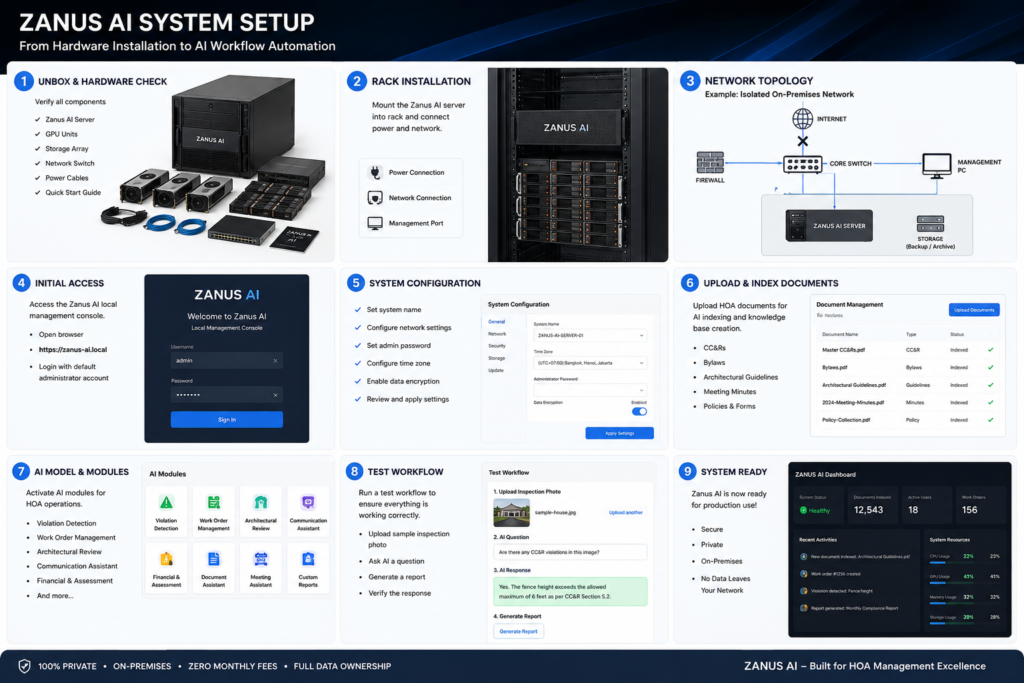
Zanus AI deploys as a turnkey hardware asset, arriving with pre-loaded local software modules and neural models. Your team does not need engineering or programming background to get the system up and running.
Phase 1: Pre-requisites and Data Onboarding
Before uploading records into the system, your operational data must be systematically structured and prepared:
- Raw Data Collection: Gather all historical files defining your community’s legal boundaries and operation records. This includes active CC&Rs, bylaws, specific design manuals, archived board resolutions, resident registries, accounting books, and historical vendor logs.
- Data Cleansing & Modernization: Remove outdated documents that have been superseded by newer amendments. For legacy paper records or lower-quality scans, run a standard optical character recognition (OCR) utility to convert them into searchable, text-clean PDF files.
- Metadata Tagging Structure: To maximize AI response speed and precision, categorize files using explicit naming conventions or local directory tags (e.g., tag building rules with
#ArchitecturalGuidelinesand balance sheets with#FinancialRecords2025). - Precision Vector Store Indexing: Upload the structured files into the secure Zanus local dashboard. The server handles text chunking internally, converting raw text strings into mathematical embeddings stored inside the local vector database. This strict retrieval-augmented generation (RAG) model ensures the AI pulls information exclusively from your approved local documents, rather than hallucinating or pulling data from external web sources.
Phase 2: System Configuration
Once data onboarding wraps up, use the internal visual configuration tools to align the AI’s decision parameters with your specific community policies.
- Business Rule Engineering: Utilize the built-in Visual Automation Builder to establish clear operational triggers without writing code. For example, configure a rule stating: “If an urgent maintenance request contains keywords like ‘pipe burst’ or ‘active water leak,’ immediately flag the on-duty engineer and issue an automated alert to adjacent units.”
- Communication Tone Calibration: Define how the system drafts resident-facing communications. Instruct the model to utilize formal, objective, and legally firm phrasing when generating assessment notices or formal violation warnings. Conversely, set a welcoming, community-focused tone for newsletters or event announcements.
- Role-Based Access Control (RBAC): Implementing tight access tiers is essential to keep operational data safe. The system supports custom permissions for unlimited localized user accounts:
- Board Members: Full administrative visibility into long-term financial projections, confidential legal minutes, and operational reserve plans.
- Accounting Staff: Access restricted purely to assessment ledgers, invoicing tools, and past-due balances.
- Maintenance Technicians & Contractors: Visibility locked to open work orders, municipal maintenance schedules, and active project state updates.
- Residents: Secure portal access limited exclusively to their own account histories, rule lookups, and maintenance submissions—with no visibility into neighboring households.
Once your internal user permissions and role-based access tiers are locked down within the local dashboard, management teams should benchmark their configuration settings against broader deployment standards. Cross-referencing your setup parameters with our comprehensive Zanus AI Review allows administrators to verify processing latencies and offline vision model constraints before going live. Additionally, evaluating long-term operational expenditures alongside the specialized Zanus AI Hardware Requirements helps boards ensure their physical server room can safely sustain peak computing power loads. Navigating these upfront architectural elements is essential to run an accurate financial analysis and calculate exactly whether the platform Is Zanus AI Worth It compared to volatile cloud subscription fees. If your firm is still weighing infrastructure models, comparing a turn-key appliance to custom buildouts via a detailed Zanus AI Appliance vs Dedicated Server analysis will clarify the most sustainable technical pathway for your portfolio.
Calculate Your 5-Year AI Infrastructure Cost
Phase 3: Property Management Software Integration
Zanus AI integrates directly into your current tech stack, operating smoothly alongside existing property management software via local API connectors and real-time webhooks.
Software Integration Protocol
| Partner Software | Connection Protocol | Synced Data Fields | Operational Goal |
| AppFolio | API Connector / Webhook | Resident directories, account payment status, unit history. | Automate late fee notice drafts and ledger balance updates. |
| Yardi | API Connector / Webhook | Common area assets, historical vendor records, contractor profiles. | Automate service dispatch and score vendor performance metrics. |
| Buildium | API Connector | Inbound resident inquiries, ledger transaction histories. | Enable 24/7 automated drafting for standard rule inquiries. |
| QuickBooks | API Connector | General ledgers, balance sheets, capital reserve targets. | Automate financial trend reporting and reserve fund health statements. |
| VMS (Vantaca) | API Connector | Design modification forms, committee approval states. | Shorten architectural review turnaround times through pre-screening. |
3. Real-World Workflows & Automation Playbooks
Moving administrative tasks over to specialized local AI Agents allows your management team to shift from manual tracking to high-level oversight.
Standard Operating Playbooks
Playbook 1: Automated Assessment Delinquency Handling
Chasing late fees manually drains time and resource budgets. Zanus AI handles collection workflows through a structured, closed-loop routine:
- Dues Delinquency Identification: The system continually reviews accounting databases synchronized from platforms like QuickBooks or AppFolio. When it logs a past-due balance past a predefined grace period (e.g., the 10th of the month), it triggers the outreach workflow.
- Contextual Notice Generation: The AI scans the specific unit’s ledger to generate a tailored notice. The initial notice adopts a polite, professional tone, listing itemized past-due amounts along with a direct online payment link.
- Escalation Workflows: If the ledger shows no payment after a set window (e.g., 10 days post-notice), the AI automatically pulls relevant clauses from the community’s bylaws or the Davis-Stirling Act to draft a formal second notice detailing late penalties. This draft is placed directly into the manager’s approval queue.
Playbook 2: Automated Screening for Standard Maintenance Requests
Filtering minor maintenance tickets can easily overwhelm a small office. Zanus AI automates the workflow end-to-end:
- Intake and Categorization: A resident uploads a maintenance request along with a photo via the local portal. The AI performs semantic analysis to determine the issue type (e.g., classifying a burned-out hallway light fixture under routine electrical maintenance).
- Budget Compliance Verification: The system matches estimated repair costs against available operational funds and business rules. If the cost falls below a preset automatic limit (e.g., $150) and a trusted vendor is available, the AI automatically drafts the work order, pings the contractor, and updates the resident with the scheduled service date.
- Dynamic Scheduling Optimization: If a contractor reports a scheduling conflict, the AI automatically suggests open time slots and updates the master maintenance dashboard, keeping manual intervention to a minimum.
Playbook 3: Intelligent Grievance and Dispute Triage
When general complaints arrive in the shared inbox (e.g., noise complaints or pet violations), the AI processes the entry based on severity:
- Urgency Triage: The system scans the message text. If it identifies safety risks or active security hazards, it bypasses standard queues and routes an immediate alert to the property manager.
- Bylaw Cross-Referencing: For standard quality-of-life grievances, the AI queries the local CC&R database to isolate the exact rule being violated.
- Resolution Draft Processing: The AI generates a formal letter directed to the unit under review, outlining the specific complaint details (while keeping the reporting neighbor strictly anonymous to ensure privacy) and cleanly citing the precise bylaw fine structure if the behavior continues.
Operational KPIs to Monitor Success
To accurately track your return on investment post-deployment, monitor these clear administrative efficiency metrics:
- Average Response Turnaround: The time elapsed from a resident submitting a rule question to receiving a verified answer from the local AI system. This window typically drops from 24–48 hours down to under 5 minutes for standard bylaw lookups.
- Administrative Automation Efficiency ($\eta_{\text{admin}}$): The percentage of time staff save on repetitive paperwork and routine scheduling. This operational metric is tracked via the following formula:$$\eta_{\text{admin}} = \left(1 – \frac{T_{\text{AI}}}{T_{\text{traditional}}}\right) \times 100\%$$
- Where: $T_{\text{AI}}$ represents the total management hours dedicated to processing and confirming administrative paperwork after deploying Zanus AI; $T_{\text{traditional}}$ is the historical baseline hours required to process those same items manually.
- Performance Baseline: Once baseline training completes, this metric consistently tracks between 35% and 50%, saving an average of 10 working hours per staff member every week.
- SLA Maintenance Compliance: The percentage of community work orders resolved within agreed service level windows, driven by the AI’s instant prioritization engine and automated contractor follow-ups.
- Resident Satisfaction Score (CSAT): Direct metrics measuring resident sentiment regarding the clarity, speed, and fairness of board communications.
If you are scaling your enterprise AI deployment and need robust, high-bandwidth bare-metal hosting without exorbitant cloud egress fees, check out our in-depth NovoServe Review and our NovoServe vs Hetzner Comparison to find the right server specs for your budget. Additionally, if your team manages multi-language workflows or cross-border project documentation, read our hands-on Palabra AI Review and Palabra AI vs Lokalise Breakdown to learn how automated AI localization can streamline your content pipeline.
4. Risk Mitigation & Legal Guardrails
Deploying artificial intelligence within a regulated residential framework requires clear structural boundaries to prevent compliance issues or privacy violations.
Absolute PII Isolation and Regulatory Compliance
The biggest challenge when using cloud-hosted AI in property management is protecting sensitive Personally Identifiable Information (PII)—including financial history, social security numbers, and private legal records. Standard cloud AI architectures process data on public servers, which can easily violate state-level consumer privacy acts or financial data security protocols.
Zanus AI addresses this risk directly through its on-premises design. Your community data, violation documentation, and financial files stay on the physical machine inside your management office. The server supports true air-gapped configuration, meaning the system can process information and run complex models without any live connection to the open web. This setup keeps data control entirely in your hands and ensures smooth compliance with local data security regulations from day one.
Technical Defenses Against Hallucinations
If an AI fabricates a non-existent rule or misinterprets a bylaw, it can create significant liability for an HOA board. For example, if the system mistakenly tells a homeowner they can add an unapproved extension to their house when the master CC&Rs expressly forbid it, the board could face costly disputes.
To completely prevent these errors, you must enforce a strict two-layer operational boundary:
- Grounded Retrieval-Augmented Generation (RAG): The Zanus AI engine is locked down to search strictly within the verified database of your community documents. When a resident asks a question, the AI scans your local files to pull the exact rule text and provides direct citations. If the local data doesn’t contain the answer, the system is programmed to state clearly: “The requested information is not found in the current community regulations. Your inquiry has been routed to management for direct review.”
- Human-in-the-Loop Safeguards: Even though the AI can draft accurate violation notices, assessment letters, and architectural reviews, the system is intentionally designed without the ability to send communications autonomously. All generated text is held as a draft inside a secure review queue. A human manager must review the text, make any necessary adjustments, and click approve before the document is officially issued.
5. Summary & Actionable Launch Checklist
Moving to Zanus AI marks a practical shift for HOA boards. By choosing a private on-premises server over unpredictable cloud platforms, your board secures its data, ensures consistent rule enforcement, and frees management from overwhelming paperwork. This setup controls operating expenses while providing fast, reliable service to the entire community.
Executive Launch Checklist
Property managers can use this master checklist to organize and execute a smooth Zanus AI deployment:
Phase 1: Infrastructure Setup
- [ ] Set up a secure, climate-controlled space with restricted physical access for the Zanus AI server inside the management office.
- [ ] Insert the included hardware activation dongle into the server to verify your perpetual local license.
- [ ] Connect the server directly to the office network switch using a high-speed Ethernet connection.
Phase 2: Data Collection and Digital Transformation
- [ ] Gather active master deeds, CC&Rs, bylaws, board resolutions, and past architectural design records.
- [ ] Use an OCR scanner to convert all legacy paper files or flat images into clean, searchable PDFs.
- [ ] Export clean resident contact lists, ledger balances, and payment transaction logs into clean CSV or Excel files.
Phase 3: System Optimization & Access Controls
- [ ] Upload your processed files into the local dashboard to index them into the Precision Vector Store.
- [ ] Set up precise Role-Based Access Control (RBAC) tiers for board members, accountants, field technicians, and residents.
- [ ] Set your communication tone to standard professional formatting for all official notices.
Phase 4: Property Management Tech Integration
- [ ] Link your active property management system (AppFolio, Yardi, Buildium, etc.) using the built-in API tools.
- [ ] Verify the real-time data sync for resident accounts, open past-due balances, and maintenance tickets.
Phase 5: Workflow Validation & Testing
- [ ] Run test scenarios for automated past-due notices and violation letters to confirm the AI cites rules accurately.
- [ ] Double-check that all resident-facing communications are held in the draft queue for human validation.
- [ ] Train office staff on how to use the local chat interface to look up complex rules quickly during daily operations.
For technical hardware specifications, software model updates, or to request an on-site installation consultation, visit the official resource portal at zanusai.com.
Related HOA Resources
If you’re planning a Zanus AI deployment, you may also find these guides helpful:
- Zanus AI Review – Explore the platform’s features, hardware architecture, and real-world use cases before deployment.
- Best AI Property Inspection Software for HOAs (2026) – Compare Zanus AI with other leading HOA inspection solutions.
- Manual vs. AI Property Inspections – Understand how AI-driven inspections improve consistency, accuracy, and compliance.
If you are scaling your enterprise AI deployment and need robust, high-bandwidth bare-metal hosting without exorbitant cloud egress fees, check out our in-depth NovoServe Review and our NovoServe vs Hetzner Comparison to find the right server specs for your budget. Additionally, if your team manages multi-language workflows or cross-border project documentation, read our hands-on Palabra AI Review and Palabra AI vs Lokalise Breakdown to learn how automated AI localization can streamline your content pipeline.