The software engineering landscape has reached a defining inflection point. In early 2026, the integrated development environment (IDE) market underwent a major consolidation as Cursor, the AI-native VS Code fork built by Anysphere, achieved an unprecedented $2 billion annualized revenue (ARR) run rate, doubling its ARR in a span of just three months. With more than 2 million users, 1 million paying customers, and active utilization across half of the Fortune 500, Cursor is no longer a niche tool for early adopters; it has become a serious competitor to legacy coding assistants.
This transition represents an architectural shift. While GitHub Copilot remains a highly successful developer tool with over 4.7 million subscribers, its core architecture as an IDE plugin is increasingly challenged by Cursor’s unified, AI-first editor environment. Developers are shifting toward the comprehensive Cursor vs GitHub Copilot paradigm due to its repository-wide contextual integration, agentic autonomy, and decoupled model layers.
Architectural & Context Differences: Unifying the Local State
The fundamental divergence between these platforms lies in how they construct, maintain, and query the local codebase context. While GitHub Copilot functions as a downstream client extension layered on top of VS Code, JetBrains, or Neovim, Cursor is a deep fork of the VS Code core. This architectural difference shapes how both tools manage context retrieval.
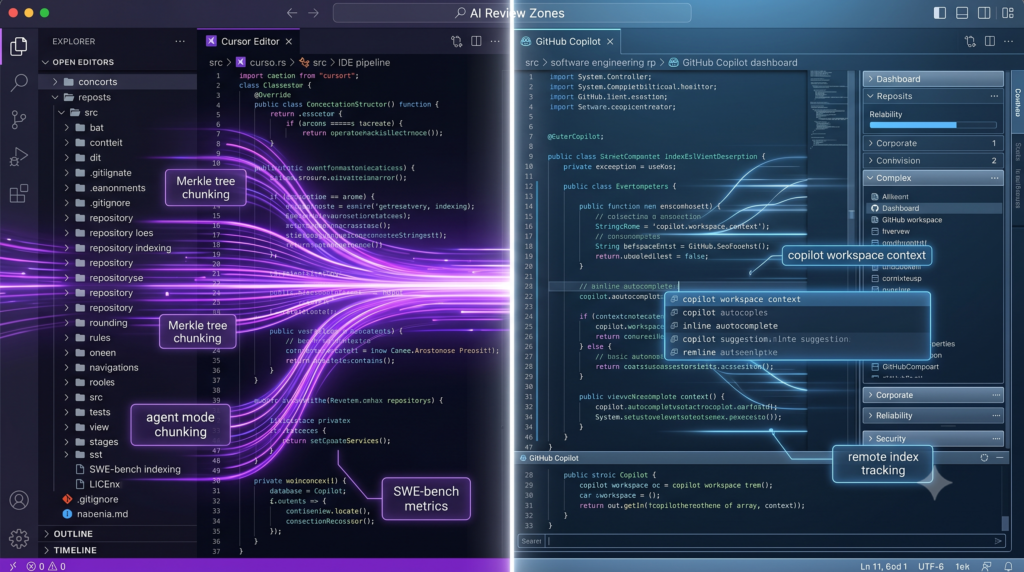
Cursor’s Local Codebase Indexing Pipeline
Cursor constructs its semantic understanding of a codebase through an incremental Retrieval-Augmented Generation (RAG) pipeline that operates natively within the editor’s event loop. The pipeline is driven by five distinct stages:
Plaintext
[Local Code Change]
        │
        ▼
[Merkle Tree Synchronization] ──> (Filters unchanged files instantly)
        │
        ▼
[Tree-sitter AST Parsing] ──────> (Extracts functions, classes, and logical nodes)
        │
        ▼
[Semantic Chunking] ────────────> (Groups AST nodes into ~500-token blocks)
        │
        ▼
[Path Obfuscation] ─────────────> (Masks sensitive file/folder names with nonces)
        │
        ▼
[Turbopuffer Vector Storage] ───> (Stores embeddings and metadata asynchronously)
- Merkle Tree Synchronization: To maintain state synchronization without inducing local performance lag, Cursor utilizes a client-side Merkle tree structure. When local changes occur, only the hashes of modified files and their direct parent directories up to the root diverge. By walking only the divergent branches where hashes differ, Cursor evaluates codebase deltas in $O(\log N)$ time. For a workspace containing fifty thousand files, the filenames and SHA-256 metadata sum to approximately 3.2 MB; rather than transmitting this entire payload on every event, Cursor isolates changed files instantly.
- Tree-sitter AST Parsing: Once file changes are detected, Cursor employs Tree-sitter, an incremental source code parser, to compile the raw text into an Abstract Syntax Tree (AST). Unlike simple regex splits or character-count boundaries, AST-based chunking models the structural syntax of the code, mapping parent nodes (such as classes, interfaces, or assignments) down to statement and variable children.
- Semantic Chunking: Chunking algorithms—often built on lightweight open-source frameworks such as Chonkie—traverse these syntax trees to divide source files into semantically coherent, size-bounded units averaging roughly 500 tokens. This structural mapping ensures that logical blocks, such as class functions or complex loops, are kept whole within single vector chunks, avoiding syntax fragmentation at chunk boundaries.
- Path Obfuscation: Privacy is maintained client-side via directory path obfuscation before any metadata is transmitted. File paths are segmented by
/and.delimiters and masked utilizing a local secret key and a fixed cryptographic nonce (for instance, mappingsrc/payments/invoice_processor.pytoa9f3/x72k/qp1m8d.f4). This preserves the logical folder hierarchy for metadata filtering while shielding proprietary product codenames or architecture structures from server-side exposure. - Turbopuffer Vector Storage: The resulting vector representations, generated asynchronously via a custom embedding model optimized on real developer agent sessions, are dispatched alongside the obfuscated metadata to Turbopuffer, a high-performance, serverless vector database. The local system caches these embeddings on AWS, keyed by chunk content hashes, which prevents redundant computation during minor subsequent edits.
This system also supports collaborative, secure index sharing. By utilizing similarity hashes (simhashes) on the local workspace state, a developer onboarding to a massive repository can match their codebase simhash against a teammate’s pre-computed server-side vector index. The server validates the user’s access rights via client-side Merkle tree content proofs before copying the index, cutting time-to-first-query from hours to seconds.
GitHub Copilot’s Context Retrieval Engine
Historically, GitHub Copilot relied on calculated context and implicit context heuristics within the active file. For real-time, low-latency tab autocomplete, Copilot uses Jaccard similarity metrics to identify similarities between the active document and other recently open editor tabs. The similarity is defined by:
$$J(A, B) = \frac{|A \cap B|}{|A \cup B|}$$
where $A$ represents the feature set (e.g., token shingles or type names) of the active document, and $B$ represents the features of a neighbor tab. While GitHub Copilot introduced local and remote workspace indexing in 2026, this index is heavily gated. Copilot’s real-time, low-latency tab autocomplete continues to rely on open editor tabs rather than seamlessly querying the broader semantic index. Cursor’s proprietary autocomplete model, conversely, directly queries its repository-wide vector index to yield completions aligned with codebase-wide patterns.
| Context Parameter | Cursor Editor | GitHub Copilot |
| Primary Indexing Database | Turbopuffer (Serverless Vector DB) | Local SQLite / Remote GitHub Code Search |
| Parsing Mechanism | Tree-sitter Abstract Syntax Tree (AST) | Textual heuristics & VS Code IntelliSense |
| Sync Protocol | Cryptographic Merkle Tree | Git push tracking & local filesystem watchers |
| Client-Side Obfuscation | Hash-key segmentation with fixed nonces | None (relies on local processing) |
| Autocomplete Context | Codebase-wide semantic embeddings | Active file and Jaccard-similar open tabs |
| Onboarding Acceleration | Cryptographic Simhash index reuse | Manual workspace initialization |
| Custom Rules Format | Local .cursorrules configuration files | .github/copilot-instructions.md |
Code Workflow Case Study: Express Monolithic Server Refactoring
To understand how these architectural differences manifest in developer workflows, a multi-file refactoring scenario is analyzed. The objective is to refactor a monolithic, messy Express Node.js application (src/server.ts) into a modular, clean Model-View-Controller (MVC) architecture using TypeScript.
Phase 1: Blueprint Planning via Plan Mode
The developer triggers Plan Mode (with Shift+Tab) in Cursor’s Agent panel. Cursor reads the monolithic file, evaluates the directory structure, and produces an execution plan (plan.md):
Markdown
### Plan: Refactor Monolithic Server to MVC Architecture
*   **Context:** Currently, `src/server.ts` contains database connections, routes, and business logic in a single file. We need to refactor this into a modular MVC structure.
*   **Proposed File Structure:**
    *   `src/config/database.ts` (Database singleton connection)
    *   `src/services/userService.ts` (Database query abstractions)
    *   `src/controllers/userController.ts` (Express request/response handling)
    *   `src/routes/userRoutes.ts` (Endpoint routing definitions)
    *   `src/app.ts` (Clean Express application entry point)
Phase 2: Single-File Surgical Extraction with Cmd+K
The developer opens src/server.ts, selects the raw authentication middleware logic (lines 45–90), and executes Cmd+K with the prompt: “Extract this validation block as a standalone ‘validateOrder’ function, ensuring Express Request and Response type signatures are preserved.” Cursor processes the selection and generates an inline diff:
TypeScript
// BEFORE: Inline database validation logic inside the route handler
app.post('/api/orders', async (req: Request, res: Response) => {
  if (!req.body.items || req.body.items.length === 0) {
    return res.status(400).json({ error: 'Empty items list' });
  }
});

// AFTER (Generated by Cmd+K)
export function validateOrder(req: Request, res: Response, next: NextFunction): void {
  if (!req.body.items || req.body.items.length === 0) {
    res.status(400).json({ error: 'Empty items list' });
    return;
  }
  next();
}
Phase 3: Logic Flattening with Cmd+L
The developer observes a deeply nested database query chain in the controller logic. By selecting the block and hitting Cmd+L, the chat interface is initialized to reconstruct the nested functions into guard clauses using early return patterns:
TypeScript
// Refactored Handler using Early Returns
export async function createUserController(req: Request, res: Response) {
  const { email, password } = req.body;

  if (!email || !password) {
    return res.status(400).json({ error: 'Credentials missing' });
  }

  const userExists = await userService.findUserByEmail(email);
  if (userExists) {
    return res.status(409).json({ error: 'User already registered' });
  }

  const newUser = await userService.createUserRecord(email, password);
  return res.status(201).json(newUser);
}
Phase 4: Coordinated Cross-File Execution with Composer
With the individual steps planned, the developer switches the Composer panel to Agent mode to perform a batch refactoring operation across the rest of the workspace using the prompt: “Execute Phase 2 through Phase 5 of @plan.md.”
Cursor’s Composer autonomously creates the target directories, splits the monolithic logic of src/server.ts into individual services, controllers, and routes, and configures the imports. It runs terminal compilation checks (npm run type-check) to verify import paths.
Core Efficiency Metrics and Autonomous Execution Benchmarks
Beyond user-experience differences, the transition within the Cursor vs GitHub Copilot ecosystem is driven by distinct productivity patterns.
Real-World Execution: Accuracy vs. Agility
On the industry-standard SWE-bench Verified (2026 Results), which evaluates AI agents on their ability to solve real GitHub issues on large-scale repositories, the two tools display contrasting advantages:
- GitHub Copilot: Solves 56.0% of tasks, with an average resolution time of 89.9 seconds per task.
- Cursor: Solves 51.7% of tasks, with an average resolution time of 62.9 seconds per task.
Plaintext
SWE-bench Verified Execution Matrix (2026):
┌────────────────────────────────────────────────────────┐
│ GitHub Copilot: 56.0% Solve Rate [Conservative/Precise]│
│ 🕒 89.9s ▓▓▓▓▓▓▓▓▓▓▓▓▓▓▓▓▓▓▓▓▓▓▓▓▓▓▓▓▓                  │
├────────────────────────────────────────────────────────┤
│ Cursor Editor: 51.7% Solve Rate [Autonomous/Parallel]  │
│ 🕒 62.9s ▓▓▓▓▓▓▓▓▓▓▓▓▓▓▓▓▓▓▓    (30% Faster Velocity)  │
└────────────────────────────────────────────────────────┘
While GitHub Copilot demonstrates higher precision on isolated, single-step tasks, its sequential operational loop is slower. Cursor operates roughly 30% faster because its agent architecture executes parallel directory edits and resolves runtime compiler errors natively in a background terminal loop.
Autonomous Agent Paradigms
- Cursor Composer Agent: Cursor 2.0 and 3.0 feature an autonomy slider. It permits the developer to control the agent’s permissions, running from single-file approvals up to fully autonomous executions that run terminal commands, inspect runtime logs, and self-correct compilation errors. Background Agents can run up to eight parallel sessions in sandboxed cloud virtual machines, generating pull requests asynchronously.
- GitHub Copilot Coding Agent: Copilot operates within a serverless GitHub Actions environment. While this integration allows developers to delegate task-solving directly from GitHub issues—generating branches, running CI, and outputting PRs directly—it lacks the interactive, real-time feedback loops of Cursor’s in-editor execution.
Reasoning & LLM Integration: Decoupled Cognitive Layers
The core pricing advantage of Cursor is its decoupled model interface, which separates the user interface from the underlying model provider.
Plaintext
                       ┌──> Autocomplete (Supermaven Engine)
                       │
[Cursor Auto-Routing] ─┼──> Complex Planning (Claude Opus 4.6 / o3)
                       │
                       └──> Rapid Feature Scaffolding (GPT-4o / Gemini)
Cursor treats frontier LLMs as interchangeable cognitive layers. Within a single session, a developer can route different subtasks to specialized models via Auto Mode. Simple text editing or boilerplate generation is routed to lower-cost models, whereas complex architectural changes are routed to frontier reasoning engines. Power users can bypass Cursor’s credit allocations entirely by configuring the IDE to use their own API keys.
Conversely, GitHub Copilot has expanded its model selection to include Claude Sonnet and Gemini Pro. However, its interface remains less modular. Model switching is less fluid, and access to premium reasoning engines (such as Claude Opus 4.6 or o3) is gated behind premium payment tiers (e.g., Copilot Pro+ at $39/month). On standard tiers, Copilot limits premium requests to a fixed cap (such as 300 requests/month), charging a flat overage rate of $0.04 per request thereafter.
| Feature Dimension | GitHub Copilot (Pro Tier) | Cursor Editor (Pro Tier) | GitHub Copilot (Pro+ / Enterprise) |
| Monthly Subscription | $10/month | $20/month | $39/user/month |
| Premium Quota Limit | 300 monthly queries | 500 fast premium queries | 1,500 premium queries |
| Low-Latency Completions | Unlimited | Unlimited (Supermaven) | Unlimited |
| Model Availability | GPT-4o, Claude Sonnet | Claude Sonnet, GPT-5, Gemini | Claude Opus 4.6, o3, GPT-5 |
| Bring-Your-Own-Key | Not Supported | Fully Supported | Not Supported |
| Overage Cost Structure | Flat $0.04 per query | Shifted to slow-queue | Flat $0.04 per query |
Community Sentiment, Friction Points, and Limitations
Technical feedback from forums like Reddit (r/programming, r/webdev) and X reveals clear limitations on both sides of the spectrum.
Cursor’s Friction Points and Limitations
- Proprietary IDE Lock-In: Because Cursor is a standalone fork of VS Code, it requires developers to abandon alternative environments such as JetBrains, Xcode, or Neovim, creating organizational friction.
- Memory Exhaustion on Large Monorepos: Cursor builds its local codebase index in RAM during execution. On massive monorepos exceeding 10,000 files, semantic search can trigger memory leaks, with RAM consumption spikes exceeding 100GB. This requires manual configuration of
.cursorignorefiles. - Shortcut Hijacking: Cursor overrides standard VS Code shortcuts by default. For example, remapping
Cmd+Kfrom its standard behavior of clearing the terminal to opening the inline AI prompt panel disrupts developer muscle memory.
GitHub Copilot’s Friction Points and Limitations
- Sluggish Execution: A common complaint among Copilot users is the latency in applying edits. Generating code changes sequentially can feel slow, and the editor can occasionally hang during complex file writes.
- Narrow Autocomplete Context Window: Unlike Cursor, which leverages the local semantic index, Copilot’s inline completions are primarily restricted to local tabs and files open in the active editor, missing project-specific coding standards across broader modules.
Verdict: Strategic Decision Matrix
| Primary Technical Scenario | Recommended Platform | Decision Rationale & Trade-offs |
| Solo Builder / Early-Stage Startup | Cursor Editor | Maximize velocity, leverage autonomous agent modes, and utilize flexible model options. |
| Enterprise with JetBrains / Vim Standards | GitHub Copilot | Avoid developer disruption by keeping established, customized development environments. |
| Infrastructure-Heavy & IaC Refactoring | Cursor Editor | Traverses deep module configurations, variables, and cross-file references natively. |
| GitHub-Native Issue & PR Automation | GitHub Copilot | Leverage the background issue-to-PR pipeline directly from GitHub platforms. |
| Highly Restrictive Security Environments | GitHub Copilot | Enterprise administrative controls, IP indemnification, and private custom knowledge bases. |
🔗 Deepen Your Research: Exclusive AI Structural Breakdowns
If you want to master the reality of autonomous workflows, enterprise automations, and modern AI models beyond the marketing hype, check out our raw, technically rigorous reviews on AI Review Zones:
- The OpenClaw Mirage: Why This Hyped AI Agent Is an Expensive Engineering Disaster — Discover the truth behind runaway subagent token burn, memory decay, and systemic loop failures that drain IT budgets.
- Gemini Pro Deep Research vs Perplexity AI: The Ultimate 2026 Battle of AI Search Titans — A brutal head-to-head evaluation analyzing multi-source synthesis, mathematical verification, and crawling accuracy.
- Agentic AI Market Analysis 2026: The Definitive Ultimate Breakdown — Learn how enterprise companies are transitioning away from chaotic “vibe-coded” autonomous infrastructure back into secure, deterministic frameworks.
- Flux.1 vs Midjourney: Has Black Forest Labs Officially Killed the King of Generative Imagery? — An exhaustive performance benchmark tracking the absolute top image engines this year under extreme stress-testing.