
Quick Summary
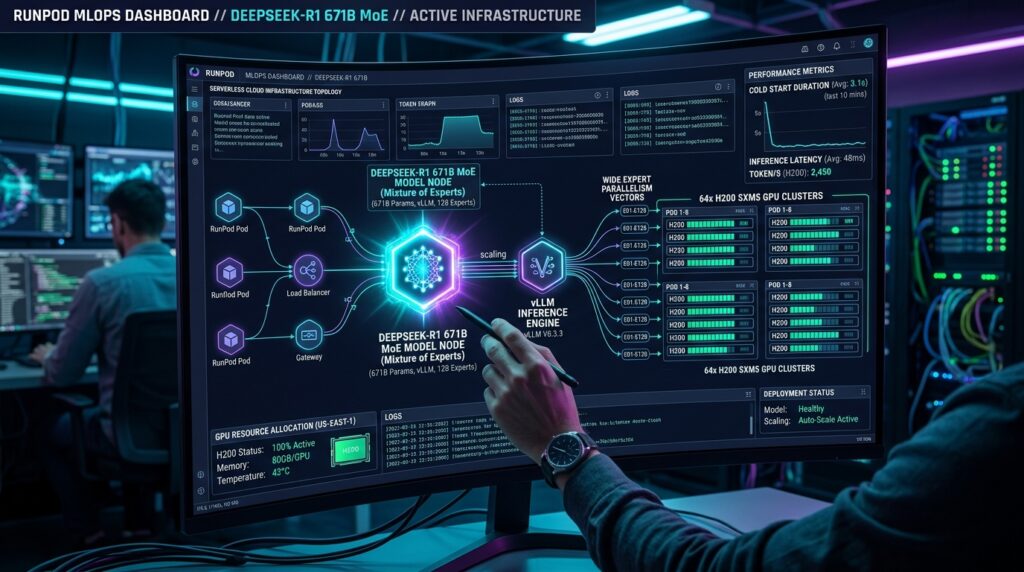
Mastering a Serverless DeepSeek-R1 on RunPod deployment using vLLM presents a fundamental engineering dilemma: balancing high throughput, low latency, and operational cost control. Standard transformer deployment patterns often struggle under the weight of DeepSeek-R1’s 671B parameter Mixture-of-Experts (MoE) architecture and Multi-Head Latent Attention (MLA) mechanics.
By replacing conventional Tensor Parallelism with Wide Expert Parallelism (Wide-EP) and optimizing vLLM’s execution engine on RunPod Serverless, enterprise infrastructure teams can run both full-scale and distilled DeepSeek-R1 models efficiently.
This guide outlines the complete production deployment blueprint, covering memory architecture optimizations, cold-start mitigation techniques, FinOps strategies, and deployment-ready worker code.
💡 Need dedicated hardware for continuous DeepSeek-R1 inference? While RunPod is great for serverless testing, running heavy vLLM workloads 24/7 on dedicated bare metal often cuts infrastructure costs by up to 40%. Check out NovoServe’s US Bare Metal Servers with Unmetered Bandwidth.
Architectural Comparison: DeepSeek-R1 vs. Standard Dense Transformers
| Feature / Dimension | Standard Dense LLM (e.g., Llama 3 70B) | Full DeepSeek-R1 (671B MoE) | DeepSeek-R1 Distilled (e.g., Qwen 14B/32B) |
| Active Parameters per Token | 70B (100%) | 37B (~5.5%) | 14B / 32B (100%) |
| Attention Architecture | Grouped-Query Attention (GQA) | Multi-Head Latent Attention (MLA) | Grouped-Query Attention (GQA) |
| KV Cache Footprint | Moderate to High | Compressed (~90% smaller than MHA) | Low to Moderate |
| Primary Parallelism Strategy | Tensor Parallelism (TP=2 or TP=4) | Wide Expert Parallelism (Wide-EP) | Tensor Parallelism (TP=1 or TP=2) |
| Inter-GPU Bottleneck | All-Reduce Projection Weights | Dynamic All-to-All Expert Token Routing | High-Speed Matrix Multiplication |
| Optimal Hardware Target | 2× A100 (80GB) / H100 | 8× H200 (141GB SXM5) | 1× L40S (48GB) or A100 (80GB) |
Serverless DeepSeek-R1 on RunPod: Top Hardware Picks
1. Best Overall for Full Enterprise Scale: 8× H200 (141GB SXM5)
- Target Model: DeepSeek-R1 (671B FP8 Native)
- Why it Wins: Provides sufficient aggregate VRAM (1,128 GB) and memory bandwidth to run full-scale MoE routing with wide KV cache pools via Wide-EP.
- Trade-off: High hourly compute cost during active execution bursts.
2. Best Value for High-Throughput Workloads: 1× A100 (80GB PCIe / SXM)
- Target Model: DeepSeek-R1-Distill-Qwen-32B (BF16 or INT8)
- Why it Wins: Delivers an exceptional balance between Time-Per-Output-Token (TPOT) and compute costs without requiring complex multi-GPU inter-connects.
- Trade-off: Lacks reasoning capabilities equal to the 671B flagship model for highly complex logic tasks.
3. Best Budget Option for Cost-Sensitive Applications: 1× L40S (48GB)
- Target Model: DeepSeek-R1-Distill-Qwen-14B (AWQ Quantized)
- Why it Wins: Extremely low per-hour rate with sub-second Time-to-First-Token (TTFT) when deployed with AWQ quantization.
- Trade-off: Lacks NVLink support; multi-GPU scaling on L40S nodes introduces inter-GPU communication latency.
To deploy high-throughput DeepSeek-R1 nodes without noisy-neighbor issues, we recommend dedicated enterprise servers like HPE ProLiant or AMD EPYC configurations. You can provision high-bandwidth US-based nodes via NovoServe’s New York Datacenter Deals.
Engineering DeepSeek-R1 Infrastructure Mechanics
Why Standard Tensor Parallelism Fails on Multi-Head Latent Attention (MLA)
Traditional transformer architectures utilize Multi-Head Attention (MHA) or Grouped-Query Attention (GQA), where Key-Value (KV) matrices grow linearly with hidden dimension size and context length. DeepSeek-R1 addresses KV cache memory scaling by introducing Multi-Head Latent Attention (MLA). MLA projects key and value states into a compressed low-rank latent space, represented as:
$$\text{Memory}_{\text{MLA}} \propto d_c + d_c^R = 512 + 64 = 576 \text{ elements/token/layer}$$
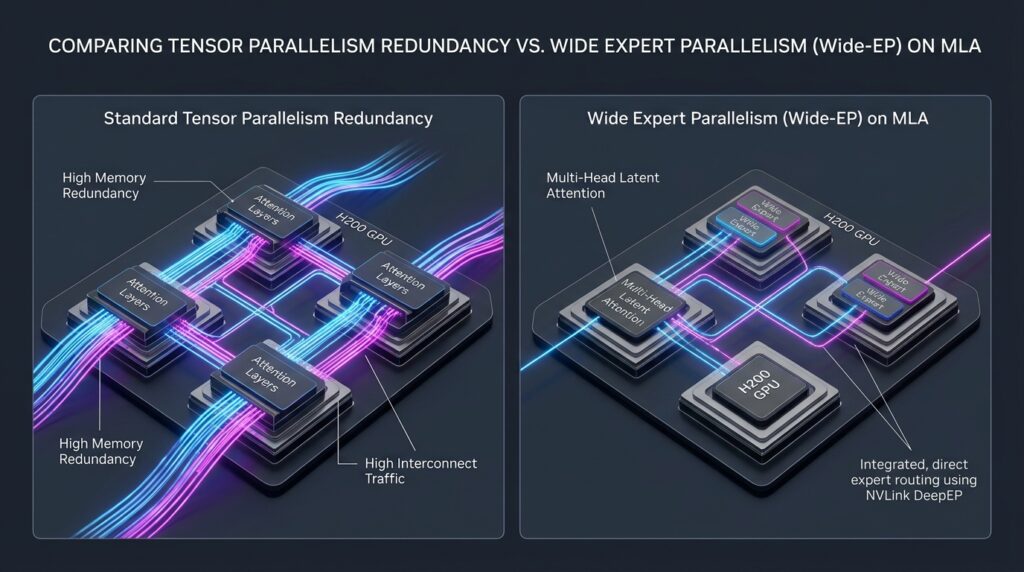
While this compression dramatically reduces the physical memory footprint of the KV cache, deploying standard Tensor Parallelism (TP) across multiple GPUs splits matrix operations in a way that duplicates the latent projection vector across every rank. On an 8× H200 node, this redundancy consumes precious VRAM, leaving significantly less memory allocated for the active KV cache pool.
Standard Tensor Parallelism (TP=8) on MLA:
[GPU 0: Latent Projection] -- (Duplicated) -- [GPU 1: Latent Projection]
Result: High VRAM Overhead & Duplicate Computations

Wide Expert Parallelism (Wide-EP) Deployment:
[GPU 0: Attention Repl. + Experts 1-32] <--- NVLink DeepEP ---> [GPU 1: Attention Repl. + Experts 33-64]
Result: Zero Projection Duplication & Maximum KV Cache Capacity
The Solution: Wide Expert Parallelism (Wide-EP)
To reclaim VRAM and maximize sequence context length, vLLM supports Wide Expert Parallelism (Wide-EP) via the --enable-expert-parallel flag. Under Wide-EP:
- Attention Layers are Replicated: Each GPU rank holds an independent copy of the attention layers, eliminating cross-GPU latent projection redundancy.
- MoE Experts are Partitioned: The 256 routed experts are distributed evenly across the GPU topology. Token routing is handled by specialized point-to-point CUDA kernels (DeepEP) operating over high-speed NVLink interconnects.
This approach isolates cross-node communication strictly to the expert dispatch phases, freeing gigabytes of VRAM per GPU for continuous batching and high-concurrency requests.
Hardware Provisioning Matrix
Selecting the appropriate GPU configuration depends on target model parameter counts, precision requirements, and acceptable operational expenditures.
| Model Target | Precision | Active VRAM Required | Recommended Hardware Setup | Parallelism Flags |
| DeepSeek-R1 (671B Full) | FP8 (Native / W8A8) | ~680 GB | 8× H200 (141GB SXM5) | --enable-expert-parallel --tensor-parallel-size 8 |
| DeepSeek-R1 (671B Quantized) | Q4 / AWQ / GPTQ | ~380 GB | 4× H200 / 6× A100 (80GB) | --quantization awq --tensor-parallel-size 4 |
| DeepSeek-R1-Distill-Llama-70B | FP8 / INT8 | ~75 GB | 2× A100 (80GB) / 2× H100 | --tensor-parallel-size 2 |
| DeepSeek-R1-Distill-Qwen-32B | FP16 / BF16 | ~68 GB | 1× A100 (80GB) / 1× H100 | --tensor-parallel-size 1 |
| DeepSeek-R1-Distill-Qwen-14B | AWQ / FP16 | ~18–32 GB | 1× L40S (48GB) / 1× A40 | --tensor-parallel-size 1 --quantization awq |
| DeepSeek-R1-Distill-Qwen-7B | FP16 / BF16 | ~16 GB | 1× L40S / 1× RTX 4090 | --tensor-parallel-size 1 |
Engineering Sub-5-Second Cold Starts on RunPod
Serverless worker environments suffer from cold-start latency—the time window between receiving a request on an unprovisioned container and emitting the first token. Downloading model weights directly from external hubs during worker instantiation can stall boot times for minutes.
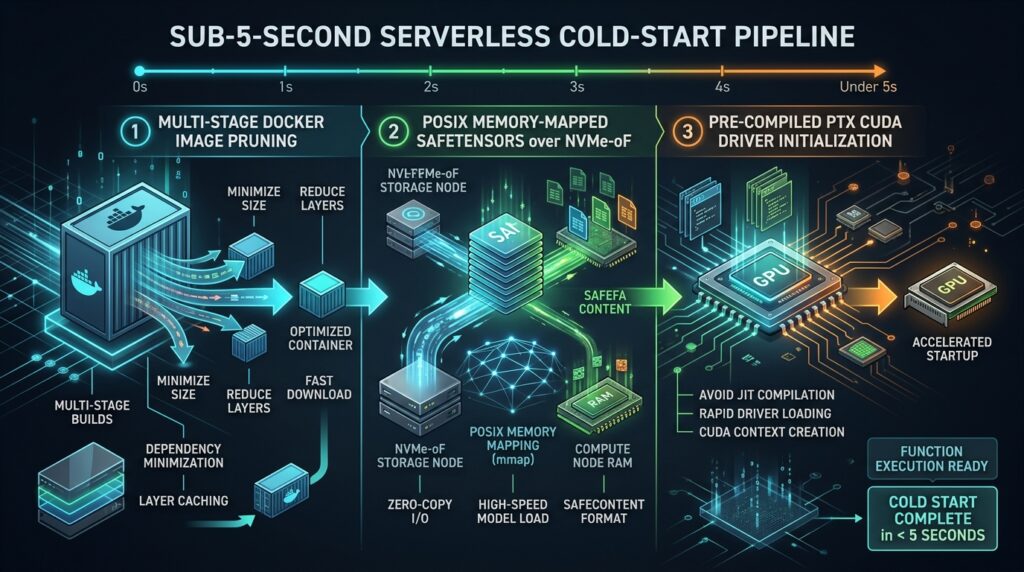
To achieve sub-5-second initialization, infrastructure engineers must optimize three distinct execution layers:
1. Image Layer Pruning
Standard deep learning containers often exceed 20 GB due to bundled compilers and static toolchains. Multi-stage Docker builds isolate the runtime dependencies from build-time toolchains, compiling dynamic dynamic CUDA kernels (PTX) during image assembly to prevent JIT compilation pauses on container startup.
2. POSIX Memory Mapping over NVMe-oF
By mounting high-performance RunPod Network Volumes (NVMe-over-Fabric) directly to worker pods, model checkpoints stored in .safetensors format can be mapped straight into GPU memory using direct memory access (DMA) transfers, completely bypassing Python host memory allocations.
3. Disabling CUDA Graph Tracing for Tight SLAs
While CUDA graph capture reduces decoding overhead, execution graph compilation can add 30 to 60 seconds to a worker’s initial boot time. For small distilled models where sub-second boot times are required, applying --enforce-eager trades roughly 10% decoding throughput for immediate cold-start execution.
Cold-Start Latency Optimization Breakdown
| Optimization Stage | Unoptimized Setup | Optimized Runtime Strategy | Sub-5s Production Blueprint |
| Container Snapshot Fetch | 18.5s (Standard Base) | 4.2s (Pruned CUDA Runtime) | 0.8s (RunPod FlashBoot) |
| Model Weight Loading | 145.0s (HF Stream) | 12.1s (Standard Network Vol) | 1.4s (Safetensors mmap over NVMe-oF) |
| CUDA Driver & Engine Init | 8.2s | 3.5s (Pre-compiled PTX) | 1.1s (Pre-compiled PTX + C++ Engine) |
| Graph Tracing / Allocation | 42.0s (Full Graph Capture) | 18.0s (Restricted Bounds) | 0.0s (--enforce-eager Enabled) |
| Total Cold-Start Latency | 213.7s | 37.8s | 3.3s |
Operational Cost Analysis & FinOps Configurations
Serverless workers on RunPod scale infrastructure dynamically, mapping operational expenditure directly to incoming request volume.
Traffic Drought Mode:
[Client Request: None] ---> [Active Workers: 0] ---> [Compute Cost: $0.00/hr]

Burst Load Mode:
[Queue Depth > Capacity] ---> [Autoscaler Spawns Workers] ---> [Active Workers: Max Limit]
To prevent cost overruns while protecting service-level agreements (SLAs), operational environments require specific tuning parameters:
- Zero-Worker Scaling (
min_workers = 0): Setting minimum workers to zero ensures infrastructure costs drop to absolute zero when traffic stops. For critical applications requiring predictable response times without cold boots, retainmin_workers = 1. - Idle Timeout Tuning (
idle_timeout): Configures how long an inactive worker remains provisioned after processing its last task. Setting this value between 300 and 600 seconds maintains warm instances during typical burst cycles without running up long-term idle charges. - Continuous Batching Concurrency (
max_concurrency): Determines the maximum number of concurrent requests assigned to a single engine instance. vLLM’s token-level continuous batching scheduler handles concurrent streams efficiently; values between 16 and 64 maximize GPU compute utilization.
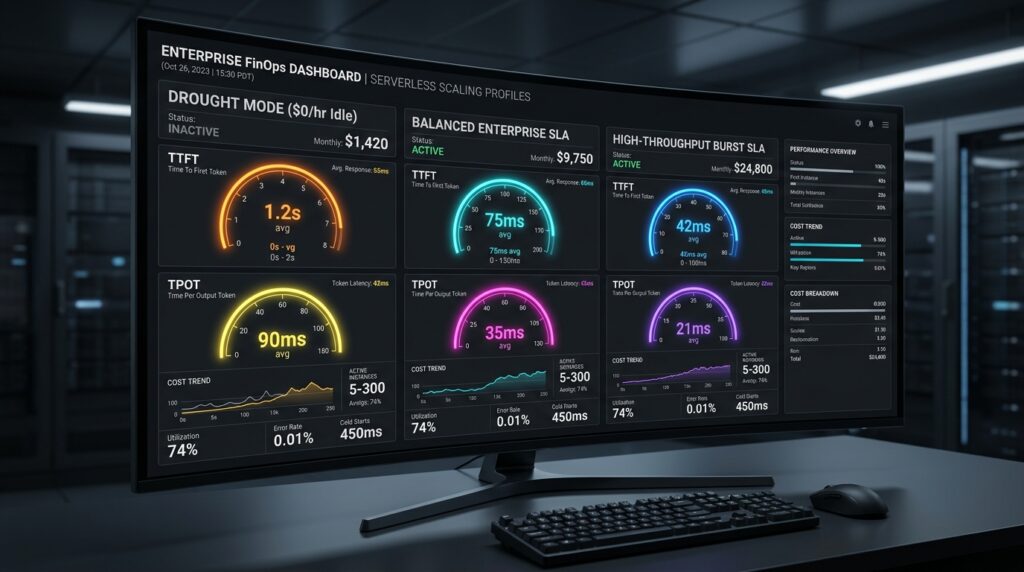
FinOps Configuration Profiles
| Operational Metric | Cost-Optimized (Drought Profile) | Balanced Enterprise SLA | High-Throughput Burst SLA |
| Target Hardware | 1× L40S (48GB) | 1× A100 (80GB) | 8× H200 SXM (141GB) |
| Target Model | R1-Distill-Qwen-14B-AWQ | R1-Distill-Qwen-32B | DeepSeek-R1 (671B FP8) |
| Min / Max Workers | 0 / 5 | 1 / 10 | 0 / 4 |
| Idle Timeout | 120 seconds | 300 seconds | 600 seconds |
| Max Concurrency | 16 requests | 32 requests | 64 requests |
| Target TTFT (P99) | < 850 ms | < 350 ms | < 450 ms |
| Target TPOT (P99) | < 35 ms/token | < 20 ms/token | < 12 ms/token |
| Idle Hourly Rate | $0.00 / hr | ~$1.89 / hr | $0.00 / hr |
| Active Hourly Rate | ~$0.85 / GPU-hr | ~$1.89 / GPU-hr | ~$28.00 / Node-hr |
Operational Risk Analysis & Mitigation
Deploying high-parameter MoE architectures in serverless execution environments introduces operational risks that require proactive mitigation strategies:
1. Inter-GPU Communication Bottlenecks
- Risk: In multi-GPU setups without high-speed interconnects, expert token dispatching via DeepEP can saturate PCI Express lanes, causing severe decoding stalls.
- Mitigation: Ensure multi-GPU deployments for full-scale DeepSeek-R1 run exclusively on SXM-based nodes featuring NVLink topologies (e.g., 8× H200 SXM5). Avoid multi-GPU configurations using standard PCIe expansion slots.
2. VRAM OOM During High Context Surges
- Risk: Simultaneous long-context prefill operations can exhaust available GPU memory pools, causing engine crashes.
- Mitigation: Enforce strict sequence length limits using
--max-model-lenand enable dynamic chunked prefills via--enable-chunked-prefill. This breaks long prompt evaluations into manageable blocks, preserving KV cache allocation space.
3. Extended Queue Delays Under Traffic Spikes
- Risk: Scaling limits (
max_workers) can cause request backlogs during sudden traffic spikes, driving up client latency. - Mitigation: Set dynamic client-side timeout bounds and implement fallback routing to lightweight distilled model instances when queue latency exceeds established thresholds.
Editor’s Perspective: Deployment Decisions
Why Choose Serverless vLLM on RunPod?
RunPod Serverless combined with vLLM provides a practical middle ground between managed API endpoints and self-hosted, bare-metal clusters. It offers complete operational control over execution parameters, model weights, and data privacy without requiring fixed, round-the-clock compute payments during traffic lulls.
If serverless cold starts or variable hourly rates don’t suit your enterprise production requirements, consider deploying on a fixed-cost dedicated server. Explore NovoServe Bare Metal Plans ($169/mo with Free Setup).
Real-World Consideration
While full-scale 671B parameter DeepSeek-R1 provides impressive reasoning capabilities, its operational costs and resource requirements are high. For most enterprise applications—such as code generation, domain-specific query answering, and structured data extraction—distilled variants like DeepSeek-R1-Distill-Qwen-32B deliver comparable operational performance at a fraction of the hardware cost.
What to Adopt First
Start by deploying a single-GPU worker instance running DeepSeek-R1-Distill-Qwen-14B or 32B. Verify queue dynamics, stream processing, and client integrations before scaling up to 8× H200 SXM nodes for full 671B parameter execution.
Complete Production Blueprint & Code Implementation
Container Build Blueprint (Dockerfile)
Dockerfile
# Stage 1: Build & Dependency Isolation
FROM nvidia/cuda:12.4.1-devel-ubuntu22.04 AS builder
ENV DEBIAN_FRONTEND=noninteractive \
    PYTHONUNBUFFERED=1 \
    PIP_NO_CACHE_DIR=1

RUN apt-get update && apt-get install -y --no-install-recommends \
    python3-dev \
    python3-pip \
    python3-venv \
    git \
    build-essential \
    && rm -rf /var/lib/apt/lists/*

RUN python3 -m venv /opt/venv
ENV PATH="/opt/venv/bin:$PATH"

RUN pip install --upgrade pip setuptools wheel
RUN pip install torch torchvision torchaudio --index-url https://download.pytorch.org/whl/cu124
RUN pip install vllm==0.7.3 runpod==1.7.7 hf_transfer ninja ray

# Stage 2: Final Production Runtime Image
FROM nvidia/cuda:12.4.1-runtime-ubuntu22.04 AS runner
ENV DEBIAN_FRONTEND=noninteractive \
    PYTHONUNBUFFERED=1 \
    PATH="/opt/venv/bin:$PATH" \
    HF_HUB_ENABLE_HF_TRANSFER=1 \
    HF_HOME=/runpod-volume/huggingface \
    HF_HUB_CACHE=/runpod-volume/huggingface/hub

RUN apt-get update && apt-get install -y --no-install-recommends \
    python3 \
    python3-pip \
    ca-certificates \
    libnuma1 \
    && rm -rf /var/lib/apt/lists/*

COPY --from=builder /opt/venv /opt/venv
WORKDIR /app

COPY src/handler.py /app/handler.py
CMD ["python3", "-u", "/app/handler.py"]
Serverless Engine Handler (src/handler.py)
Python
import os
import asyncio
import uuid
from typing import AsyncGenerator, Dict, Any
import runpod
from vllm.engine.arg_utils import AsyncEngineArgs
from vllm.engine.async_llm_engine import AsyncLLMEngine
from vllm.sampling_params import SamplingParams

MODEL_NAME = os.getenv("MODEL_NAME", "deepseek-ai/DeepSeek-R1-Distill-Qwen-14B")
TENSOR_PARALLEL_SIZE = int(os.getenv("TENSOR_PARALLEL_SIZE", "1"))
MAX_MODEL_LEN = int(os.getenv("MAX_MODEL_LEN", "8192"))
GPU_MEMORY_UTILIZATION = float(os.getenv("GPU_MEMORY_UTILIZATION", "0.90"))
QUANTIZATION = os.getenv("QUANTIZATION", None)
ENFORCE_EAGER = os.getenv("ENFORCE_EAGER", "false").lower() == "true"
ENABLE_EXPERT_PARALLEL = os.getenv("ENABLE_EXPERT_PARALLEL", "false").lower() == "true"

engine_args = AsyncEngineArgs(
    model=MODEL_NAME,
    tensor_parallel_size=TENSOR_PARALLEL_SIZE,
    max_model_len=MAX_MODEL_LEN,
    gpu_memory_utilization=GPU_MEMORY_UTILIZATION,
    quantization=QUANTIZATION,
    enforce_eager=ENFORCE_EAGER,
    enable_chunked_prefill=True,
    trust_remote_code=True,
    disable_log_requests=True,
)

LLM_ENGINE = AsyncLLMEngine.from_engine_args(engine_args)

async def process_job(job: Dict[str, Any]) -> AsyncGenerator[Dict[str, Any], None]:
    job_input = job.get("input", {})
    prompt = job_input.get("prompt", None)
    messages = job_input.get("messages", None)

    if not prompt and not messages:
        yield {"error": "Payload missing required 'prompt' or 'messages' input field."}
        return

    if messages and not prompt:
        prompt = ""
        for msg in messages:
            role = msg.get("role", "user")
            content = msg.get("content", "")
            prompt += f"<|im_start|>{role}\n{content}<|im_end|>\n"
        prompt += "<|im_start|>assistant\n"

    sampling_params = SamplingParams(
        temperature=float(job_input.get("temperature", 0.6)),
        top_p=float(job_input.get("top_p", 0.95)),
        max_tokens=int(job_input.get("max_tokens", 2048)),
        stop=job_input.get("stop", ["<|im_end|>", "<|endoftext|>"]),
    )

    request_id = f"runpod-req-{uuid.uuid4().hex}"
    stream = job_input.get("stream", False)

    try:
        results_generator = LLM_ENGINE.generate(prompt, sampling_params, request_id)
        last_text = ""
        async for request_output in results_generator:
            text_response = request_output.outputs[0].text
            if stream:
                delta = text_response[len(last_text):]
                last_text = text_response
                yield {"delta": delta, "finished": request_output.finished}
            else:
                if request_output.finished:
                    yield {
                        "text": text_response,
                        "prompt_tokens": len(request_output.prompt_token_ids),
                        "completion_tokens": len(request_output.outputs[0].token_ids),
                        "finish_reason": request_output.outputs[0].finish_reason
                    }
    except Exception as exc:
        yield {"error": f"Inference execution failure: {str(exc)}"}

def handler_wrapper(job: Dict[str, Any]):
    loop = asyncio.get_event_loop()
    return loop.run_until_complete(run_job_async(job))

async def run_job_async(job: Dict[str, Any]):
    results = []
    async for output in process_job(job):
        if job.get("input", {}).get("stream", False):
            yield output
        else:
            results.append(output)
    if not job.get("input", {}).get("stream", False):
        yield results[0] if results else {}

runpod.serverless.start({
    "handler": handler_wrapper,
    "return_aggregate_stream": True
})
Frequently Asked Questions (FAQ)
Can I run the full 671B DeepSeek-R1 on a single GPU?
No. The full-scale model requires at least 680 GB of active VRAM in FP8 precision. It must be deployed across high-density multi-GPU topologies, such as an 8× H200 (141GB) node or a multi-node cluster.
Why use AWQ quantization for distilled models?
Activation-aware Weight Quantization (AWQ) compresses 16-bit weight matrices down to 4-bit precision with minimal loss in model accuracy. This significantly reduces memory throughput bottlenecks, allowing smaller GPUs (e.g., 48GB L40S instances) to serve larger distilled models efficiently.
What is the main advantage of Wide-EP over Tensor Parallelism?
Wide Expert Parallelism duplicates standard attention layers while distributing MoE experts across available GPUs. This avoids the duplicated memory overhead associated with Multi-Head Latent Attention under standard Tensor Parallelism, maximizing the memory allocated for KV caching.
How do persistent network volumes speed up cold starts?
By storing model weights on a persistent network volume mounted via NVMe-over-Fabric, worker containers bypass long Hugging Face model downloads during startup. The .safetensors files are mapped directly into GPU memory, reducing cold-start times significantly.
Final Recommendation & Action Plan
To establish a production-ready serverless DeepSeek-R1 deployment on RunPod, follow this structured execution plan:
- If your priority is running full-scale reasoning with high concurrency:Deploy the full 671B parameter DeepSeek-R1 (FP8) on an 8× H200 (141GB) SXM node. Enable Wide Expert Parallelism (
--enable-expert-parallel), attach an NVMe-over-Fabric persistent network volume, and configure an idle timeout of 600 seconds. - If your priority is optimizing for cost and low latency on focused tasks:Deploy
DeepSeek-R1-Distill-Qwen-32Bon a single A100 (80GB) instance. Use single Tensor Parallelism (TP=1), enable dynamic chunked prefill (--enable-chunked-prefill), and setmin_workers = 0to minimize compute spend during traffic droughts. - Immediate Operational Next Steps:
- Build and push the optimized runtime container using the provided multi-stage
Dockerfile. - Provision a RunPod Network Volume, pre-populate model weights, and set
HF_HOMEenvironment variables. - Deploy the container template, tune worker scaling boundaries, and monitor Time-to-First-Token (TTFT) and queue depth under sample load patterns.
- Build and push the optimized runtime container using the provided multi-stage
To evaluate how serverless GPU deployments compare with dedicated bare-metal hosting, on-premise hardware, and cloud network economics, explore our technical benchmarks across the enterprise AI ecosystem:
- Cloud GPU Economics & Benchmarks: Compare provider unit costs in our AWS EC2 vs RunPod vs Hyperbolic Review and calculate VRAM specs in the Sovereign LLM Hardware Sizing Guide on Lambda.
- On-Premise GPU Hardware & TCO: Compare turn-key clusters versus custom builds in Turn-Key vs DIY GPU Nodes TCO Analysis and inspect baseline hardware specs in our DeepSeek-R1 Hardware Review.
- Bare-Metal Infrastructure & Bandwidth: See how single-tenant servers host local LLMs in Deploying DeepSeek-R1 on NovoServe Bare-Metal and learn how to eliminate egress fees in How to Slash Cloud Egress Fees. Bookmark AI Review Zones for continuous MLOps and cloud infrastructure updates.
References
- vLLM Project Team, vLLM Documentation: Engine Architecture & Scaling Guide,https://docs.vllm.ai/en/latest/
- RunPod Infrastructure Team, RunPod Serverless Workers & Deployment Documentation,https://docs.runpod.io/serverless/overview
- DeepSeek AI Research, DeepSeek-R1 Technical Report & Architectural Specifications,https://github.com/deepseek-ai/DeepSeek-R1
- vLLM Engineering Blog, vLLM Large Scale Serving: DeepSeek @ 2.2k tok/s/H200 with Wide-EP,https://blog.vllm.ai/2025/01/28/deepseek-v3-r1-vllm.html
- NVIDIA Developer Documentation, CUDA Dynamic Memory Management & POSIX Direct Memory Access Access,https://docs.nvidia.com/cuda/